PDF Export
ForgeX generates PDFs directly from the application using two proposal templates: a detailed Classic breakdown and a client-ready Modern proposal. Export complete bids with cost breakdowns, scope summaries, discipline grouping, and editable proposal content.
PDF generation happens client-side using jsPDF, ensuring fast exports without server load. All bid data is formatted and styled automatically.
Features
Complete Bid Breakdown
Export all scopes, items, and cost summaries in a professional layout
Customizable Message
Include custom introduction/cover letter for each bid
Tax & Compliance Flags
Display tax exemption status, certified payroll, insurance type
Exclusions List
Automatically include active exclusions from templates
Proposal Template
A client-ready Proposal with editable Inclusions, Qualifications & Assumptions, and Terms
Discipline Grouping
Group scopes into Civil, Structural, Landscape, Architectural, and MEP sections with subtotals
Export Templates
The Export Bid dialog can produce a PDF proposal, a CSV, or an Excel file — plus a Project Management Tracking sheet (a Google Sheet or Excel export with budget-vs-actuals columns). For the PDF, you choose a Proposal Template: Classic or Modern.
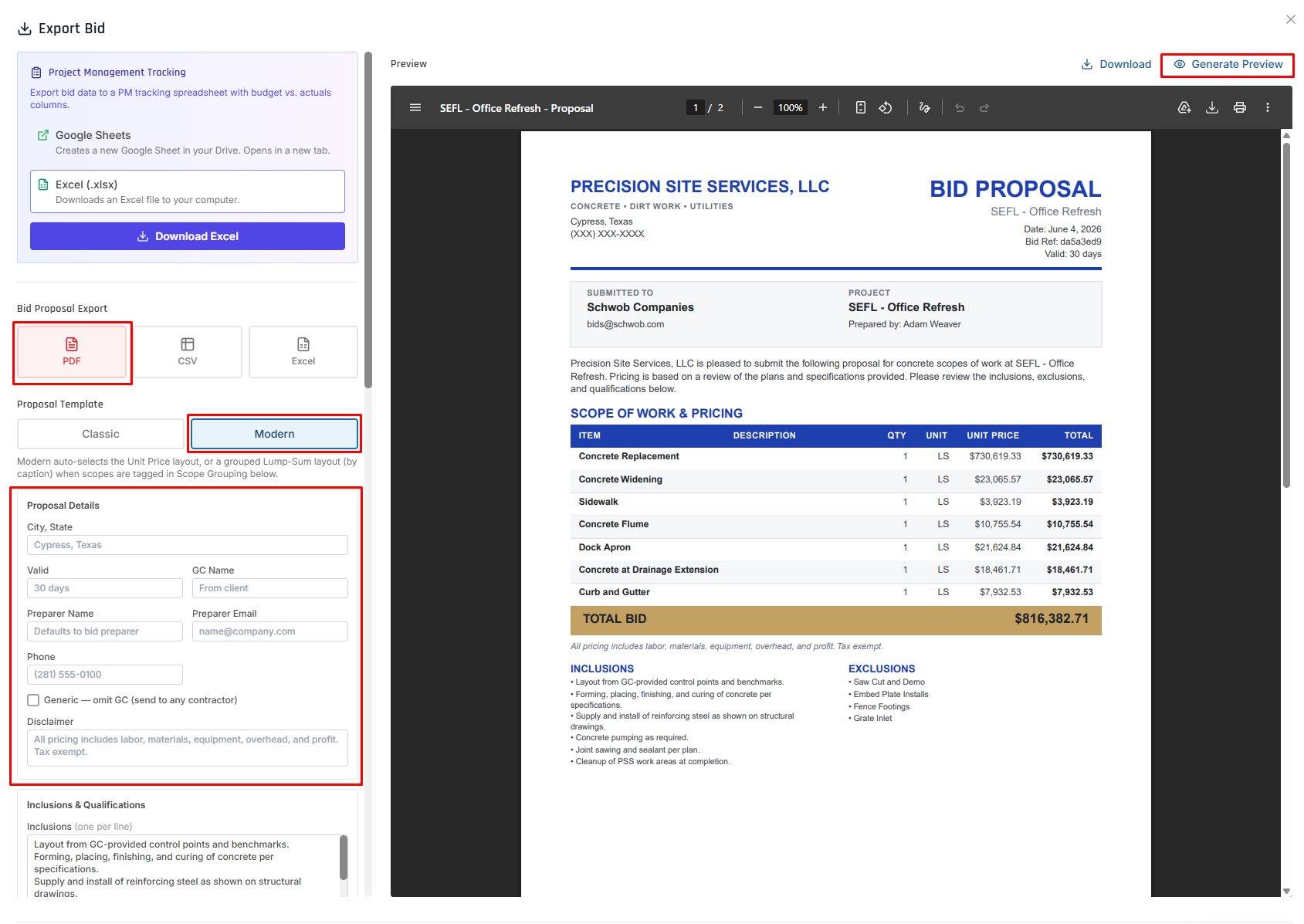
The right-hand pane is the rendered first page of the Modern proposal — it updates live as you edit, and refreshes when you click Generate Preview.
- Classic
- Modern
Best for: an internal or detailed cost breakdown.
The Classic template is the detailed export described in What's Included in the Export below — every scope, module, and line item with costs, plus the financial summary, compliance flags, and exclusions. Scope-grouping captions are limited to Civil / Structural.
Best for: the client-ready proposal you send to a general contractor.
The Modern template opens a full editor with a Proposal Details card and proposal-specific options. The layout auto-resolves:
- Unit Price — by default
- Grouped Lump-Sum (by caption) — when scopes are tagged in Scope Grouping (see below)
Use Generate Preview to render the PDF in the right-hand pane before you Download. Saved files are named <bid> - Proposal.pdf.
Proposal Details
The Proposal Details card holds the header fields that print on the proposal:
- City, State
- Valid (e.g., "30 days")
- GC Name (defaults from the client)
- Preparer Name and Preparer Email (see Preparer name)
- Phone
- Generic — omit GC checkbox (see below)
- Disclaimer — the line that prints under the totals (e.g., "All pricing includes labor, materials, equipment, overhead, and profit. Tax exempt.")
Inclusions, Qualifications & Terms
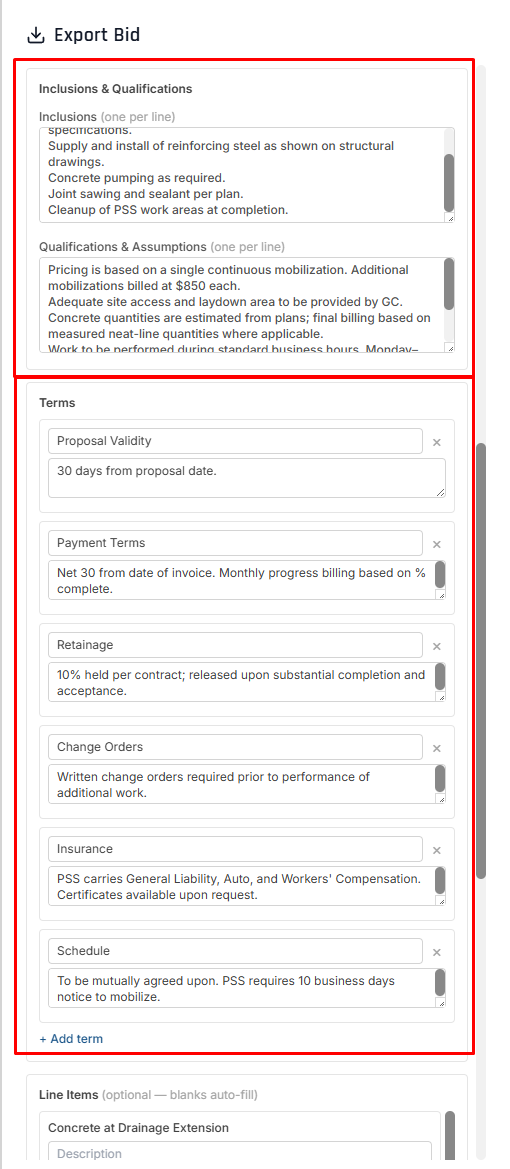
- Inclusions and Qualifications & Assumptions are free-text lists (one item per line), pre-filled with standard text and fully editable per export. Empty sections are omitted from the PDF.
- Terms are a set of labeled blocks — Proposal Validity, Payment Terms, Retainage, Change Orders, Insurance, Schedule — each with its own heading and body. Remove a block with its ×, or use + Add term for a custom one.
- Exclusions render from the bid's own active exclusions.
Line items & hiding a price
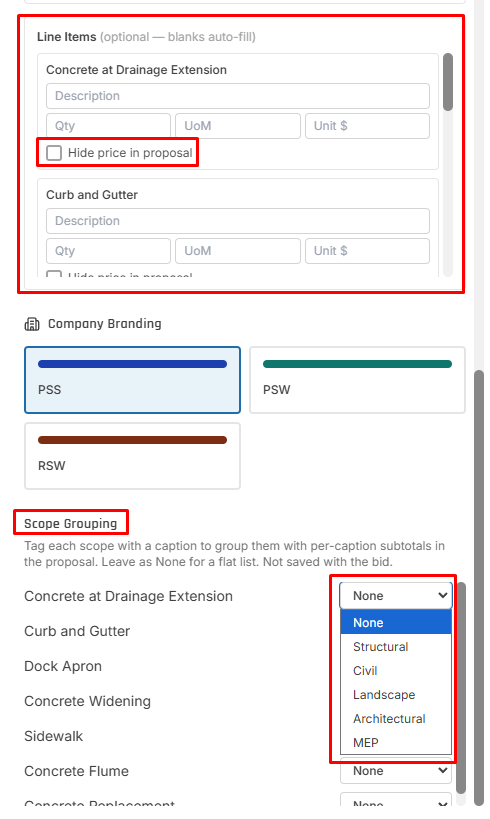
The Line Items section is optional — blanks auto-fill from the scope. For each line you can set a Description, Qty, UoM, and Unit $, and toggle "Hide price in proposal." A hidden line still counts toward its caption subtotal and the overall total — useful for allowance or alternate work you don't want to itemize.
Company branding
Choose the brand the proposal is issued under — PSS, PSW, or RSW — which sets the letterhead and branding on the PDF.
Scope grouping by discipline
Scope Grouping tags each scope with a caption to group them into per-caption sections, each with its own subtotal. The Modern template supports five captions — Structural, Civil, Landscape, Architectural, and MEP. Leave every scope set to None for a flat list. Scope Grouping applies to the export only — it's not saved with the bid.
Generic — omit GC
A "Generic — omit GC (send to any contractor)" checkbox produces a single, general-contractor-agnostic proposal you can hand to any GC. When checked, the proposal omits the GC from "Submitted To," greys out the GC Name field, and prints a neutral "Accepted By" line instead of the bid's client. It's honored in both the preview and the downloaded PDF.
Preparer name
The proposal's "Prepared by" name uses the Preparer Name you enter in Proposal Details. Leave it blank to fall back to the bid's resolved preparer. (Previously the name always came from whoever last edited the bid.)
Scope line items
Proposal line items reflect what you entered: descriptions are not auto-filled from the shape (prism / cylinder), an explicitly blank description stays blank, and per-scope line-item overrides flow into the lump-sum table.
What's Included in the Export
Every PDF export contains the following sections:
Header Section
- Company branding (Precision Site Services logo)
- Bid metadata: Job name, client name, location
- Prepared by: Estimator name
- Date prepared: Creation/last updated timestamp
The rendered header appears in the proposal preview under Export Templates above.
Bid Summary
Cost rollup showing totals by module:
| Module | Description |
|---|---|
| Concrete | Total concrete items cost |
| Labor | Total labor cost (including per diem if enabled) |
| Equipment | Total equipment rental cost |
| Materials | Total materials cost |
| Subcontractor | Total subcontractor/sublet cost |
| Miscellaneous | Total misc items cost |
Financial Summary:
Subtotal:        $X,XXX.XX
Overhead (X%):   $X,XXX.XX
Profit (X%):     $X,XXX.XX
─────────────────────────
Total:           $X,XXX.XX
Scope Overview
High-level table showing each scope's cost breakdown:
| Scope Name | Concrete | Labor | Equipment | Materials | Sublet | Misc | Total |
|---|---|---|---|---|---|---|---|
| Foundation | $10,000 | $5,000 | $3,000 | $2,000 | $1,500 | $500 | $22,000 |
| Driveway (5×) | $15,000 | $7,500 | $4,000 | $2,500 | $1,000 | $0 | $30,000 |
Scope multipliers are displayed (e.g., "Driveway (5×)") to indicate repeated areas.
Detailed Scope Breakdown
For each scope, the PDF includes:
Module-Level Details
Each module shows individual items with descriptions and costs:
Concrete Items:
• 3000 PSI Slab
  100 SF • 3.70 CY • 500 lbs rebar • #4 @ 18"
  $2,410.00

• Foundation Walls
  50 SF • 1.85 CY • 250 lbs rebar • #5 @ 12"
  $1,850.00
Labor Items:
• Concrete Finisher
  2.0 crew • 8.0 hrs/day × 5.0 days • $38/hr
  $2,052.00

• Laborer
  4.0 crew • 8.0 hrs/day × 5.0 days • $28/hr
  $3,584.00
Equipment Items:
• Dozer
  1.0 units • 5.0 days • $931/day • Delivery $150 • Fuel $250
  $5,055.00
Material Items:
• Rebar #4
  1000.0 LB • $0.92/LB • Waste 5.0%
  $966.00
Subcontractor Items:
• Concrete Pumping
  1.0 LS • $2,500/LS • Buffer 10.0%
  $2,750.00
Miscellaneous Items:
• Permits
  1.0 units • $500/unit
  $500.00
This is the Classic per-module detail. The Modern proposal instead renders a Scope of Work & Pricing table — see the Export Templates preview.
Compliance & Flags
The PDF displays important bid flags:
| Flag | Description |
|---|---|
| Tax Exempt | ✅ if bid is tax-exempt, ❌ otherwise |
| Per Diem Enabled | ✅ if per diem costs are included |
| Certified Payroll | ✅ if certified payroll required |
| C3 Required | ✅ if C3 form required |
| Drug Testing Required | ✅ if drug testing required |
| Insurance Type | CCIP, OCIP, RCIP, or None |
Exclusions
If the bid has active exclusions, they're listed at the bottom:
Exclusions:
• Permits and fees (owner-provided)
• Site utilities (existing connections assumed)
• Disposal of hazardous materials
• Work outside of scope listed above
Only active exclusions from templates are included. Inactive exclusions are omitted.
Custom Message
Optional custom message/cover letter at the top of the PDF:
"Thank you for the opportunity to bid on this project. We have reviewed the plans and specifications thoroughly. This proposal includes all labor, materials, and equipment necessary to complete the work as specified. We look forward to working with you."
Generating a PDF
Navigate to the bid you want to export.
Click the "Export PDF" button in the top toolbar.
For a PDF, pick Classic (detailed breakdown) or Modern (client-ready proposal). Selecting Modern opens the full editor with the Proposal Details card, editable Inclusions / Qualifications / Terms, Company Branding, per-scope Scope Grouping and hide-price controls, and the Generic — omit GC option. See Export Templates.
The export modal displays:
- Scope selection (export all or select specific scopes)
- Custom message field
- Preview of financial summary
See the annotated screenshot under Export Templates above.
Enter a custom message to appear at the top of the PDF. This is useful for:
- Cover letters
- Special notes to the client
- Clarifications or assumptions
By default, all scopes are exported. Uncheck scopes to exclude them:
- Useful for partial bids or alternates
- Excluded scopes won't appear in scope overview or details
- Financial summary adjusts automatically
Click "Generate PDF".
The browser generates the PDF and prompts you to download:
- Filename:
Bid_[JobName]_[Date].pdf - Example:
Bid_Commercial_Foundation_2025-01-29.pdf
Save generated PDFs to your bid attachments for easy reference and version tracking.
Customization Options
Message Customization
The custom message field supports:
- Plain text (no formatting, line breaks preserved)
- Multi-paragraph content (separate with blank lines)
- No length limit (but keep it concise for readability)
Best practices:
- Keep it professional and concise
- Use bullet points for clarity (manual formatting)
- Avoid special characters that may not render correctly
Scope Selection
Use cases for selective scope export:
Bid Alternates
Export separate PDFs for base bid vs. alternate scopes.
Example:
- Base bid: Foundation + Driveway
- Alternate 1: Add Sidewalks scope
- Alternate 2: Add Retaining Wall scope
Phased Proposals
Split large projects into phases:
- Phase 1 PDF: Excavation + Foundation
- Phase 2 PDF: Slab + Parking Lot
Client Comparison
Create multiple proposals for the same project with different scope combinations for client to compare options.
Template Variables (Future)
Planned Feature: Future versions will support template variables like {{clientName}}, {{bidNumber}}, and {{date}} in custom messages for dynamic content.
PDF Layout & Styling
Page Format
- Paper size: US Letter (8.5" × 11")
- Orientation: Portrait
- Margins: 0.5" all sides
- Font: Helvetica (sans-serif)
Typography
| Element | Font Size | Style |
|---|---|---|
| Title (Job Name) | 20pt | Bold |
| Section Headers | 14pt | Bold |
| Subsection Headers | 12pt | Bold |
| Body Text | 10pt | Regular |
| Item Details | 9pt | Regular, Gray |
Color Scheme
- Headers: Dark blue (#1a365d)
- Body text: Black (#000000)
- Item details: Gray (#718096)
- Borders: Light gray (#e2e8f0)
Table Formatting
- Headers: Bold, dark background
- Rows: Alternating white/light gray for readability
- Borders: Thin gray lines
- Alignment: Numbers right-aligned, text left-aligned
A sample rendered first page (Modern proposal) appears in the Export Templates preview above.
API Endpoint
Generate PDF Data
The backend provides a dedicated endpoint for fetching PDF-ready data:
POST /api/bids/:bidId/pdf-data

Request Body:
{
  "scopes": ["scope-id-1", "scope-id-2"],  // Optional: filter scopes
  "message": "Custom message text",         // Optional
  "overheadPercent": 10,                    // Optional: override
  "profitPercent": 5                        // Optional: override
}

Response:
{
  "meta": {
    "bidId": "bid-123",
    "jobName": "Commercial Foundation",
    "clientName": "ABC Construction",
    "clientEmail": "contact@abc.com",
    "location": "Austin, TX",
    "preparedBy": "jmckenzie@precisionsiteservices.com",
    "createdAt": "2025-01-15T10:00:00Z",
    "updatedAt": "2025-01-29T14:30:00Z"
  },
  "flags": {
    "taxExempt": false,
    "perDiemEnabled": true,
    "certifiedPayroll": true,
    "c3Required": false,
    "drugTestingRequired": true
  },
  "compliance": {
    "insuranceType": "CCIP",
    "certifiedPayroll": true,
    "c3Required": false,
    "drugTestingRequired": true
  },
  "exclusions": [
    "Permits and fees (owner-provided)",
    "Site utilities (existing connections assumed)"
  ],
  "message": "Custom message text",
  "modules": [
    { "key": "concrete", "label": "Concrete", "amount": 40000.00 },
    { "key": "labor", "label": "Labor", "amount": 20000.00 },
    ...
  ],
  "overview": [
    {
      "id": "scope-1",
      "name": "Foundation",
      "totals": {
        "concrete": 10000.00,
        "labor": 5000.00,
        "equipment": 3000.00,
        "materials": 2000.00,
        "subcontractor": 1500.00,
        "misc": 500.00,
        "total": 22000.00
      },
      "multiplier": 1,
      "shape": "Slab"
    }
  ],
  "scopes": [
    {
      "id": "scope-1",
      "name": "Foundation",
      "multiplier": 1,
      "shape": "Slab",
      "totals": { ... },
      "modules": {
        "concrete": {
          "key": "concrete",
          "label": "Concrete",
          "total": 10000.00,
          "items": [
            {
              "description": "3000 PSI Slab",
              "detail": "100 SF • 3.70 CY • 500 lbs rebar • #4 @ 18\"",
              "totalCost": 2410.00
            }
          ]
        },
        ...
      }
    }
  ],
  "financial": {
    "subtotal": 60000.00,
    "overheadAmount": 6000.00,
    "profitAmount": 3300.00,
    "totalCost": 69300.00,
    "overheadPercent": 10.0,
    "profitPercent": 5.0
  }
}
The prepareBidPdfPayload function in /services/bids/backend/src/services/pdf/bidPdfData.js handles all data transformation and formatting.
Best Practices
Review Before Exporting
Always review the bid summary in-app before generating PDF to catch errors or missing data.
Use Descriptive Job Names
Job names appear prominently in the PDF. Use clear, descriptive names for professionalism.
Keep Exclusions Updated
Regularly review and update exclusion templates to ensure they're relevant to current bids.
Save PDFs as Attachments
Upload generated PDFs to bid attachments for version tracking and easy sharing.
Troubleshooting
Common Issues
| Issue | Cause | Solution |
|---|---|---|
| Missing scopes in PDF | Scopes not linked to bid | Verify scope-bid relationships |
| Zero costs displayed | Cost rollup not triggered | Manually trigger cost rollup before export |
| Tax amounts incorrect | Tax rates outdated | Update pricing database tax rates |
| PDF won't download | Browser popup blocker | Allow popups for ForgeX domain |
| Custom message cut off | Message too long | Keep message under ~500 words |
Browser Compatibility
| Browser | Support | Notes |
|---|---|---|
| Chrome | ✅ Full | Recommended |
| Firefox | ✅ Full | |
| Safari | ✅ Full | |
| Edge | ✅ Full | |
| IE 11 | ❌ Not supported | Use modern browser |
Future Enhancements
Planned features for PDF export:
- Custom templates: Choose from multiple PDF layouts/styles
- Template variables: Dynamic content insertion (client name, bid number, etc.)
- Logo customization: Upload custom company logos
- Signature fields: Add signature blocks for client approval
- Attachment embedding: Include photos/plans in PDF
- Email integration: Send PDF directly to client from ForgeX