Bid Settings
Every bid in ForgeX has settings that control cost calculations, tax handling, compliance, and export options. They live in two places:
- Two toggles in the bid header — Tax Exempt and Enable Per Diem — that take effect immediately.
- The Bid Settings modal (the BID SETTINGS button) — a five-tab editor for this bid's variables, rates, pricing, timeline mode, and project details.
Both are per-bid and apply the moment you change them — there's no separate Save step, and changes trigger a full cost recalculation.
Where settings live
Bid header toggles
Tax Exempt and Enable Per Diem — live checkboxes on the bid page
Bid Factors & Fees
This bid's markup, tax, fuel, overhead/profit, and per-diem-rate variables
Labor Rates
Base rate + FICA / FUTA / SUTA burden, per role
Pricing Database
This bid's pricing items (Subcontractor / Materials / Rental)
Timeline Bidding
Equipment and labor timeline-mode toggles
Project Details
Insurance & compliance flags, notes, attachments, exclusions
Bid header toggles
Two checkboxes sit in the bid header, just below the bid name. They take effect immediately — no modal, no Save — and recalculate all costs.
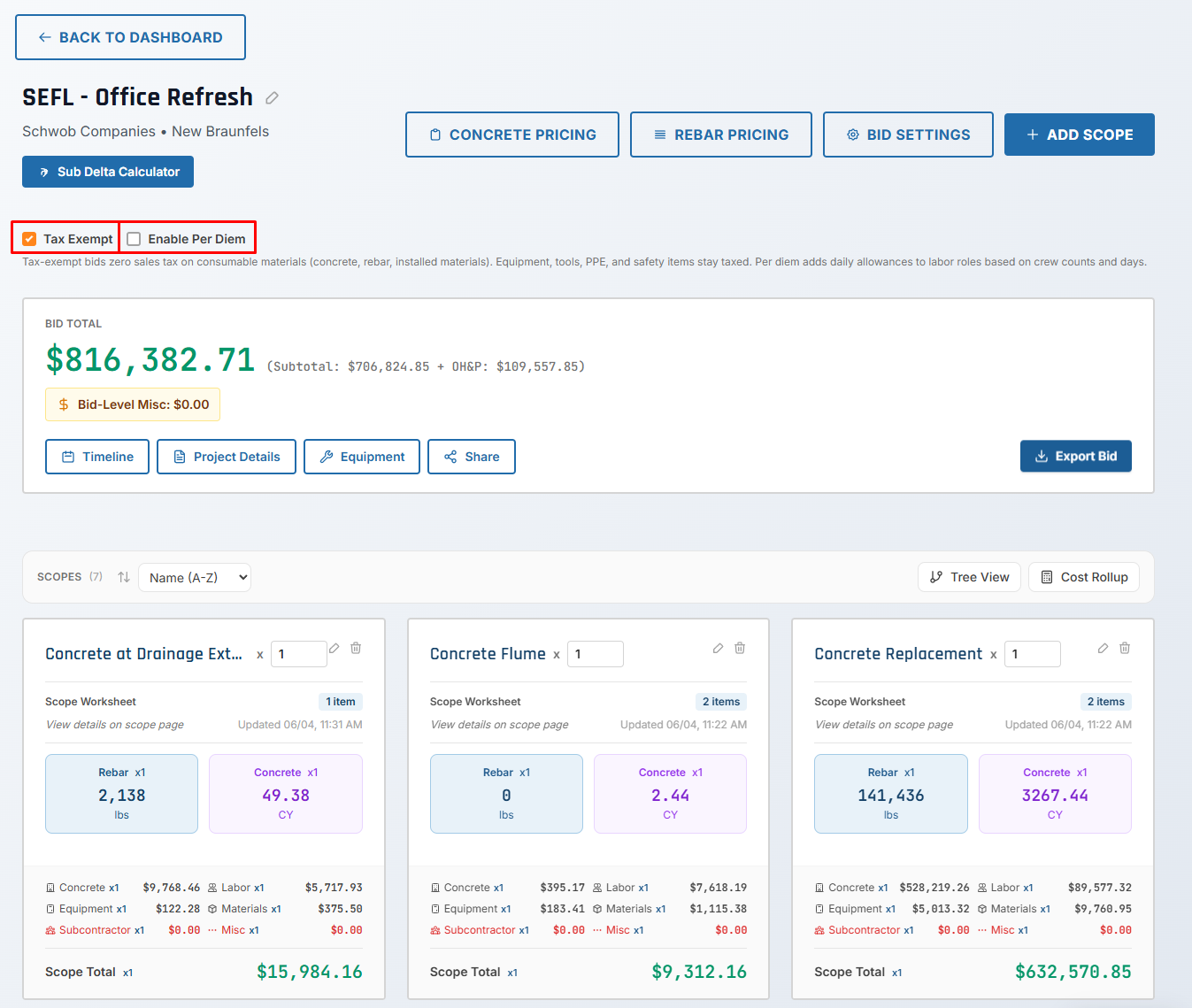
Tax Exempt
Field: taxExempt (boolean) · Default: false
Marks the bid tax-exempt for government projects, non-profits, or clients with an exemption certificate.
- Normal (Taxable)
- Tax Exempt
When unchecked (false):
- Material items include materials tax (default: 8.25%)
- Equipment items include rental tax (default: 12.25%)
- Tax amounts aggregate up to the bid total
Example:
Material: $1,000 + Tax ($82.50) = $1,082.50
Equipment: $2,000 + Tax ($245.00) = $2,245.00
──────────────────────────────────────────
Total with tax: $3,327.50
When checked (true):
- Consumable materials (concrete, rebar, installed materials) have $0 tax
- Equipment is always taxed — never exempt, even on an exempt bid
- Blades, PPE, Safety, Small Tools, and Sprayer materials stay taxed
- The bid total drops by the consumable tax only; unchecking restores it exactly
Example:
Material: $1,000 + Tax ($0)      = $1,000.00   (consumable → exempt)
Equipment: $2,000 + Tax ($245.00) = $2,245.00  (always taxed)
──────────────────────────────────────────
Total: $3,245.00
Savings: $82.50 — the consumable-material tax only. The $245 equipment tax stays.
When to use:
- Government/municipal projects
- Non-profit organizations (501(c)(3))
- Tax-exempt clients with exemption certificates
Always verify client tax-exempt status and save the exemption certificate to bid attachments.
See Tax Management for the full rule and worked examples.
Enable Per Diem
Field: perDiemEnabled (boolean) · Default: false
Adds a daily per-diem allowance to labor, based on crew counts and days. The toggle turns the calculation on; the rate is set separately as the Per_Diem_Per_Day variable on the Bid Factors & Fees tab.
- Per Diem Disabled
- Per Diem Enabled
Labor: 4 crew × 8 hrs/day × 5 days @ $38/hr

Total Labor: $6,080
Labor: 4 crew × 8 hrs/day × 5 days @ $38/hr
Base Labor: $6,080

Per Diem: 4 crew × 5 days × $138/day = $2,760
──────────────────────────────────────────
Total Labor: $8,840
Additional cost: $2,760 (per diem)
When to use:
- Projects 50+ miles from home office
- Multi-day projects requiring overnight stays
- Remote job sites without local crew
The Bid Settings modal
Click BID SETTINGS in the bid header to open the modal — "Edit variables for this bid only." Every change applies to this bid only and triggers a recalculation; each value edits inline via its pencil icon, and you close with CLOSE (there's no Save button). The modal has five tabs.
Bid Factors & Fees
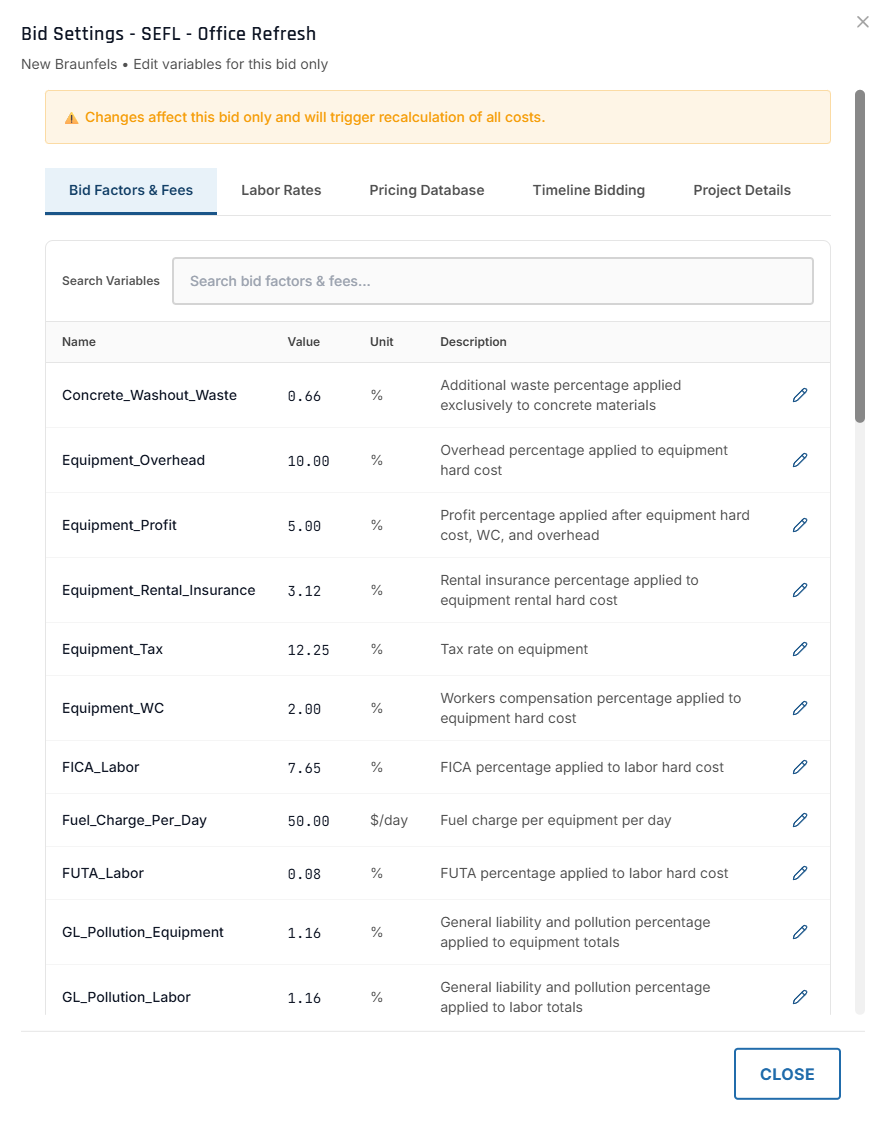
A searchable table of this bid's variables — Name / Value / Unit / Description — each editable. It includes the per-module markups (workers' comp, overhead, profit, GL/pollution, equipment rental insurance), the tax rates (Equipment_Tax, Materials_Tax, …), the fuel charge (Fuel_Charge_Per_Day), the per-diem rate (Per_Diem_Per_Day), and the bid-level overhead and profit percentages.
Overhead Percentage
Variable: Overhead_Percent · Default: typically 10%
Overhead is applied to the subtotal (sum of all scope costs).
Subtotal: $60,000
Overhead (10%): $60,000 × 0.10 = $6,000
──────────────────────────────────────────
Subtotal + Overhead: $66,000
What overhead covers: office expenses, insurance (general liability, workers' comp), truck maintenance, administrative labor, utilities and rent.
Overhead is preserved when global variables change — existing bids keep their original percentage for historical accuracy.
Profit Percentage
Variable: Profit_Percent · Default: typically 5%
Profit is applied to the subtotal + overhead.
Subtotal: $60,000
Overhead (10%): $6,000
──────────────────────────────────────────
Base for profit: $66,000

Profit (5%): $66,000 × 0.05 = $3,300
──────────────────────────────────────────
Bid Total: $69,300
Adjust overhead and profit per bid for higher-risk work (increase) or competitive bids (reduce):
- Standard Bid
- High-Risk Project
- Competitive Bid
Subtotal: $100,000
Overhead (10%): $10,000
Profit (5%): $5,500
──────────────────────────────────────────
Total: $115,500
Subtotal: $100,000
Overhead (12%): $12,000   ← Increased
Profit (8%): $8,960       ← Increased
──────────────────────────────────────────
Total: $120,960
Subtotal: $100,000
Overhead (8%): $8,000     ← Reduced
Profit (3%): $3,240       ← Reduced
──────────────────────────────────────────
Total: $111,240
The bid header shows this breakdown inline — e.g. $816,382.71 (Subtotal: $706,824.85 + OH&P: $109,557.85) — so you can see overhead & profit at a glance. See Cost Rollup.
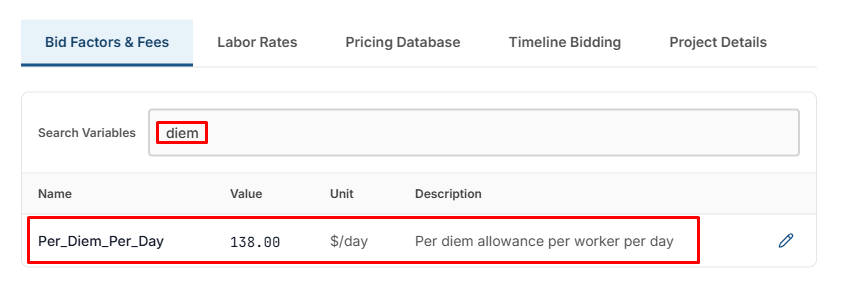
Per-diem rate (Per_Diem_Per_Day)
The per-diem rate is the editable Per_Diem_Per_Day variable (default 138.00 $/day — "per diem allowance per worker per day"). It defaults to a branch-level rate set in Admin → Estimation Settings and can be overridden on any individual bid — for example, to match a job's location. Editing it recalculates all scope- and bid-level labor. Bids created before this control self-heal: the row is added the next time you open the tab. (The Enable Per Diem header toggle still has to be on for per diem to be calculated.)
Labor Rates
The Labor Rates tab shows each role's base rate, its FICA / FUTA / SUTA burden, and the resulting burdened rate — editable per role for this bid (for prevailing-wage jobs, special agreements, or union rates). See the Labor Module for how these rates feed labor costs.
Pricing Database
The Pricing Database tab holds this bid's pricing items, filtered by Category (Subcontractor / Materials / Rental), with Add Item and per-row edit/delete. What you can see and do follows your configured view / manage pricing permissions — see Role Permissions and Pricing Management.
Timeline Bidding
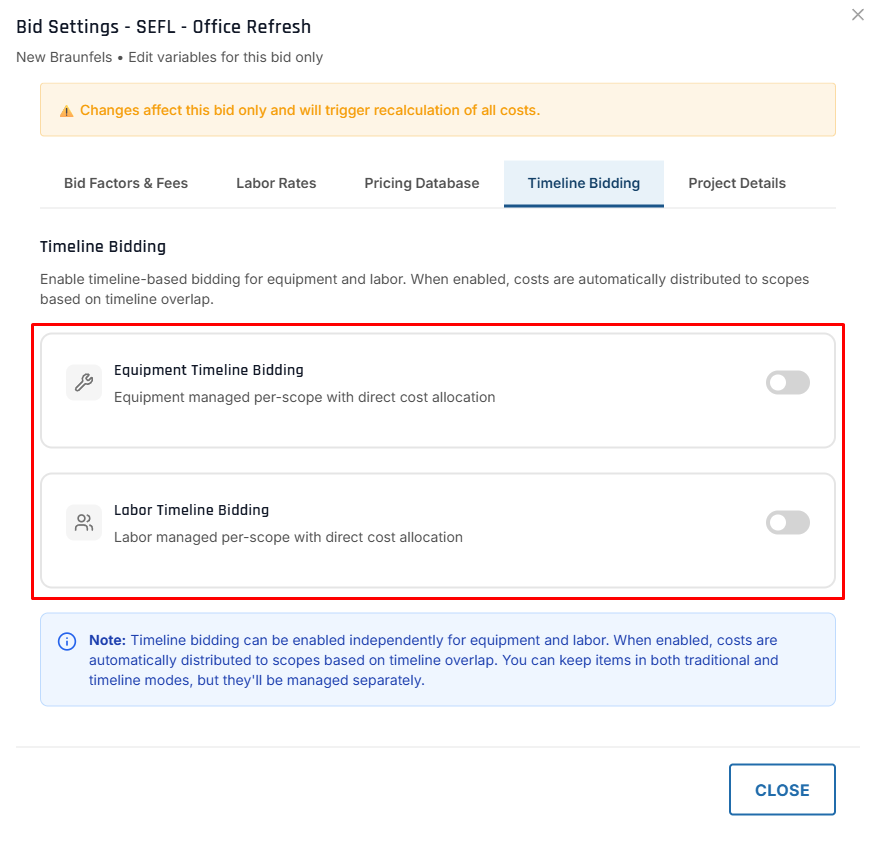
Enable timeline-based bidding for equipment and labor. When enabled, costs are automatically distributed to scopes based on timeline overlap.
Equipment Timeline Bidding
Field: equipmentBiddingMode (enum) · Options: TRADITIONAL, GANTT · Default: TRADITIONAL
- Traditional Mode
- Timeline (Gantt) Mode
When set to TRADITIONAL (default):
- Equipment added per-scope with direct cost allocation
- Standard equipment estimation workflow
Best for: Simple projects where equipment is unique to each scope.
When set to GANTT:
- Equipment managed at bid level on a visual timeline
- Costs automatically distributed to overlapping scopes
- Rate tiering: Daily (1-3d), Weekly (4-21d), Monthly (22+d)
Best for: Projects where equipment spans multiple scopes or you need visual scheduling.
Labor Timeline Bidding
Field: laborBiddingMode (enum) · Options: TRADITIONAL, GANTT · Default: TRADITIONAL
- Traditional Mode
- Timeline (Gantt) Mode
When set to TRADITIONAL (default):
- Labor added per-scope with crew composition and direct cost allocation
- Standard labor estimation workflow
Best for: Projects where crews work on one scope at a time.
When set to GANTT:
- Labor managed at bid level on a visual timeline
- Specify hours per day for each labor type
- Costs automatically distributed to overlapping scopes
Best for: Projects where labor crews move across scopes or you need schedule visualization.
Switching modes clears existing data. When you toggle a module between Traditional and Timeline mode, all existing items for that module are removed. This action requires confirmation.
Equipment and labor modes are independent — you can use Timeline for equipment while keeping Traditional for labor, or any combination.
See the Timeline Bidding Guide for the complete walkthrough.
Project Details
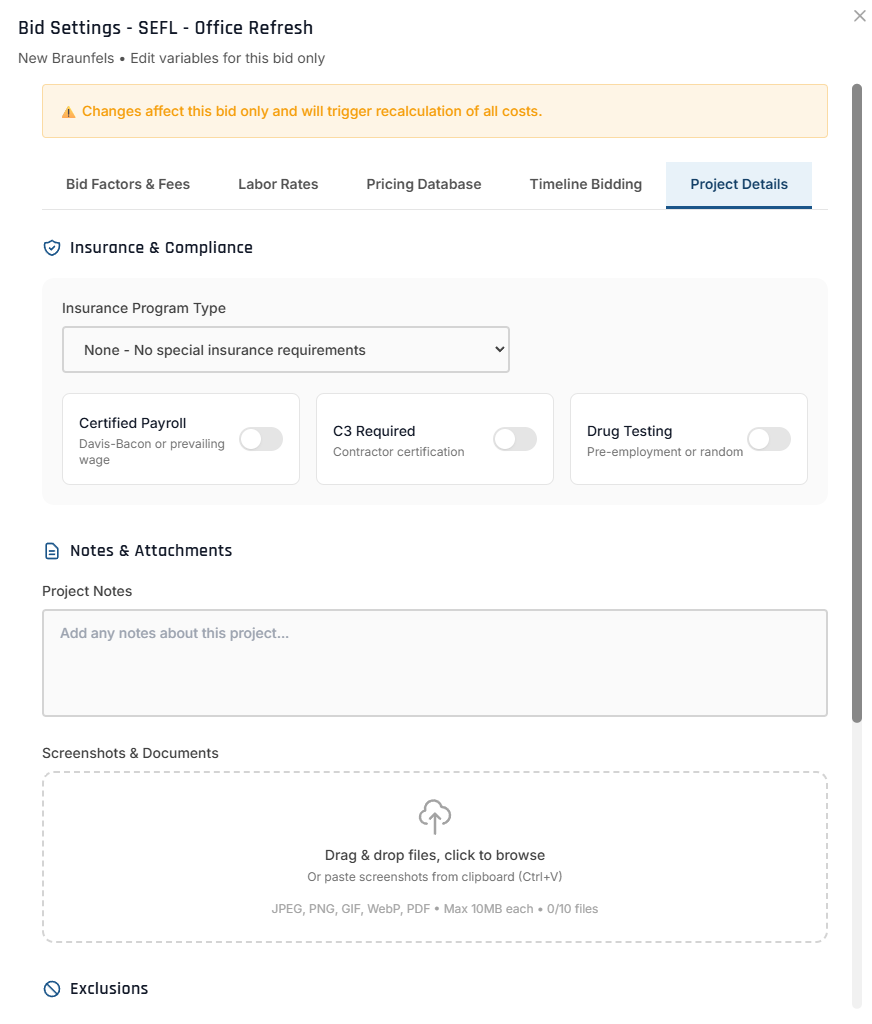
The Project Details tab holds the bid's insurance & compliance flags, project notes & attachments, and exclusions.
Insurance Program Type
Field: insuranceType (enum) · Options: CCIP, OCIP, RCIP, NONE, null · Default: null
| Type | Description | Who Provides |
|---|---|---|
| CCIP | Contractor-Controlled Insurance Program | General contractor |
| OCIP | Owner-Controlled Insurance Program | Project owner |
| RCIP | Residential-Controlled Insurance Program | Residential developer |
| NONE | No special insurance program | Standard coverage |
Why it matters: affects bid pricing (insurance may be covered by owner/GC), determines whether you include an insurance markup, and is required for compliance documentation. For example, on an OCIP project the owner provides liability insurance, so you can reduce overhead by 2-3%.
Certified Payroll
Field: certifiedPayroll (boolean) · Default: false
Indicates the project requires certified payroll reporting (Davis-Bacon Act). When on: track and report prevailing wages, submit weekly payroll reports, plan for extra administrative overhead, and a badge appears on the bid PDF. Required for federal projects over $2,000, many state/local government projects, and federally funded work.
Certified payroll compliance is managed in the Field Service (Phase 3). This flag is for documentation and cost adjustment during bidding.
C3 Required
Field: c3Required (boolean) · Default: false
Indicates the project requires a Certificate of Compliance (C3 form) for state taxes — a certificate from the Texas Comptroller verifying the contractor is current on state taxes. Required for Texas state government projects and some Texas municipal projects.
Drug Testing
Field: drugTestingRequired (boolean) · Default: false
Indicates the project requires drug testing for all crew members (pre-employment or random). When on, a badge appears on the bid PDF. Required for government, school, and healthcare projects, or as specified in bid documents.
If drug testing is required, add 1-2% to labor costs to cover testing and administrative time.
Project Notes & Attachments
Project Notes (notes, up to 5,000 characters) are internal — not included in PDF exports. Use them for assumptions, clarifications, a client communication log, and risks. You can also attach screenshots & documents (JPEG, PNG, GIF, WebP, PDF; max 10 MB each) to the bid here.
Notes:
- Spoke with client on 1/15 - confirmed 4-week schedule
- Site has difficult access, factor in extra delivery fees
- Client may request alternate for sidewalk scope
- Follow up on concrete mix design approval
Exclusions
Field: exclusions (array of BidExclusion objects)
Exclusions are items/conditions not included in the bid — they protect against scope creep and clarify boundaries. Add them from a template ("Standard Construction Exclusions," "Site Work Exclusions," or a custom template), then check/uncheck, reorder, or add custom lines. Active exclusions appear in PDF exports.
Common exclusions:
- Permits and fees (owner-provided)
- Site utilities (existing connections assumed)
- Disposal of hazardous materials
- Work outside of scope listed above
- Owner-furnished materials
See PDF & Proposal Export for how exclusions appear in proposals.
Default Values & Global Variables
Most bid settings inherit defaults from Global Variables (and branch-level Estimation Settings):
| Bid Variable | Source | Default Value |
|---|---|---|
| Overhead % | Overhead_Percent | 10% |
| Profit % | Profit_Percent | 5% |
| Per Diem Rate | Per_Diem_Per_Day | $138/day |
| Materials Tax | Materials_Tax | 8.25% |
| Equipment Tax | Equipment_Tax | 12.25% |
How defaults work:
- Admin updates a global/estimation default (e.g., Overhead = 10%)
- New bid inherits the value (Overhead = 10%)
- Admin later changes it (e.g., Overhead = 12%)
- Existing bids preserve their original value (still 10%)
- New bids use the updated value (12%)
Historical preservation ensures existing bids stay accurate even when global variables change.
Updating Settings on Existing Bids
Changing financial settings (overhead, profit, tax) on submitted or awarded bids affects pricing. Use caution and document the change.
| Change | Effect |
|---|---|
| Notes, attachments | Internal only |
| Compliance flags (certified payroll, C3, drug testing) | Documentation / PDF badges |
| Insurance type | Documentation only |
| Exclusions | Affects the PDF, not cost |
| Tax Exempt | Recalculates all costs |
| Overhead % / Profit % | Recalculates the bid total |
| Enable Per Diem / per-diem rate | Recalculates labor costs |
Add a note explaining the change, e.g. "Updated overhead to 12% per client request for competitive bid."
Flip the header toggle, or edit the variable on its tab. It applies immediately — there's no Save.
Check the bid total (and the inline subtotal + OH&P), compare old vs. new, and confirm the change is correct.
If the bid was already submitted, notify the client of revised pricing, re-export the PDF, and the change is captured in the audit log.
API Endpoints
Get Bid Settings
GET /api/bids/:bidId

Response:
{
  "id": "bid-123",
  "taxExempt": false,
  "perDiemEnabled": true,
  "overheadPercent": 10,
  "profitPercent": 5,
  "insuranceType": "CCIP",
  "certifiedPayroll": true,
  "c3Required": false,
  "drugTestingRequired": true,
  "notes": "Client confirmed schedule..."
}
Update Bid Settings
PATCH /api/bids/:bidId

Request Body:
{
  "taxExempt": true,
  "overheadPercent": 12,
  "profitPercent": 5,
  "certifiedPayroll": true
}

Response:
{
  "id": "bid-123",
  "taxExempt": true,        // Updated
  "overheadPercent": 12,    // Updated
  "profitPercent": 5,
  "certifiedPayroll": true, // Updated
  "totalCost": 68493.00     // Recalculated
}
Best Practices
Document Overrides
Add notes explaining why you override default overhead/profit percentages.
Review Before Submitting
Verify all settings are correct before changing bid status to SUBMITTED.
Use Templates for Exclusions
Create reusable exclusion templates for consistency across similar bids.
Preserve Compliance Flags
Once set, don't change compliance flags (certified payroll, drug testing, etc.) without client approval.
Common Scenarios
Government Project Bid
- Tax Exempt: ✅ (government project)
- Certified Payroll: ✅ (Davis-Bacon Act)
- C3 Required: ✅ (Texas state project)
- Drug Testing: ✅ (required by agency)
- Insurance Type:
OCIP(owner provides) - Overhead: 8% (reduced due to OCIP) · Profit: 5%
Notes: "Federal highway project, OCIP coverage, prevailing wage rates apply"
Competitive Private Bid
- Tax Exempt: ❌
- Enable Per Diem: ❌ (local project)
- Overhead: 8% · Profit: 3% (reduced for competitiveness)
- Insurance Type:
NONE· Certified Payroll: ❌
Notes: "Tight margin, client is price-sensitive, prefer repeat business"
Remote Project with Per Diem
- Tax Exempt: ❌
- Enable Per Diem: ✅ (200 miles from office), rate $138/day
- Overhead: 10% · Profit: 6% (increased for travel risk)
- Drug Testing: ✅ (client requirement)
Notes: "Crew will stay on-site for 2 weeks"
School Construction Project
- Tax Exempt: ✅ (school district)
- Certified Payroll: ✅ (state-funded)
- Drug Testing: ✅ (school policy)
- Insurance Type:
CCIP(GC provides) - Overhead: 9% (reduced due to CCIP) · Profit: 5%
Exclusions: background checks for crew (school provides), site security (school provides)
Troubleshooting
| Issue | Cause | Solution |
|---|---|---|
| Bid total not updating | Cost rollup not triggered | Re-open the bid; toggle a setting to force a recalculation |
| Tax still showing on an exempt bid | Tax Exempt not checked | Verify the Tax Exempt checkbox in the bid header is on |
| Equipment still taxed on an exempt bid | Working as intended | Equipment is always taxed — only consumables are exempt |
| Per diem not appearing | Enable Per Diem off, or rate is 0 | Turn on Enable Per Diem in the header; set Per_Diem_Per_Day in Bid Factors & Fees |
| Wrong overhead/profit | Using an old default | Override Overhead_Percent / Profit_Percent in Bid Factors & Fees |