Labor Module
The Labor Module handles all crew costs for your concrete projects, from foremen to unskilled laborers. ForgeX automatically calculates base labor costs plus all burden costs (FICA, FUTA, SUTA, auto costs).
This guide covers Traditional Mode (per-scope labor). For Timeline Mode where labor is managed at bid level with visual scheduling and automatic cost distribution, see Timeline Bidding.
Labor Roles
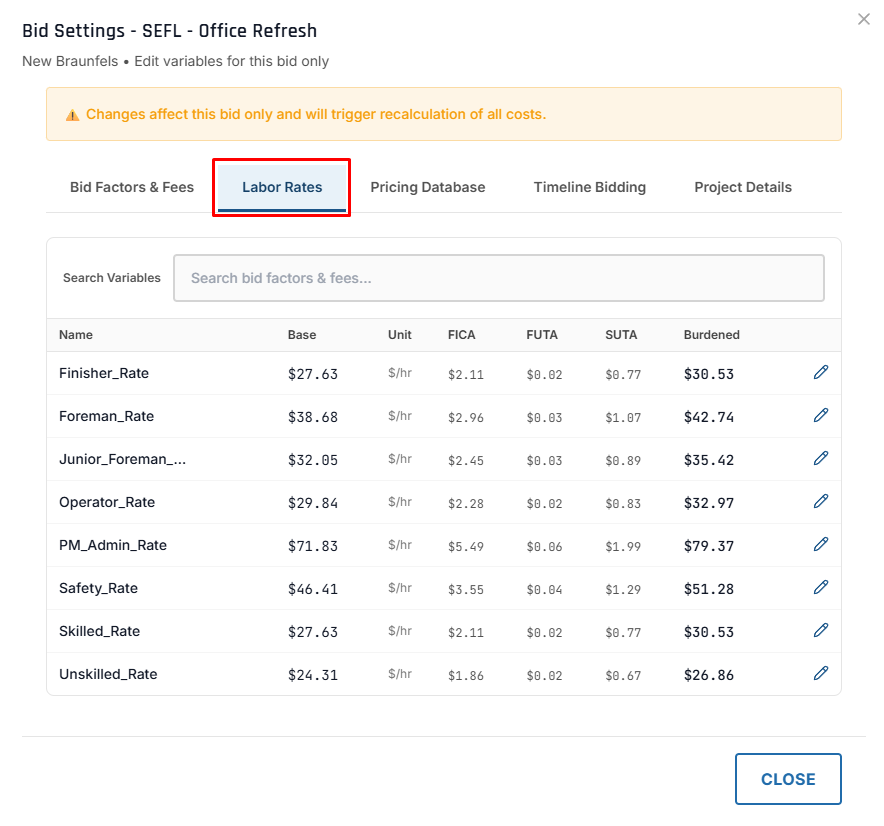
ForgeX includes 9 standard labor roles with default hourly rates:
| Role | Default Rate | Typical Responsibilities |
|---|---|---|
| On Site Executive PM Work | $71.83/hr | Project oversight, client relations |
| On Site Safety | $46.41/hr | Safety management, inspections |
| Supervision Only | $42.00/hr | Dedicated supervision |
| Labor Foreman | $38.68/hr | Crew supervision, quality control |
| Junior Foreman | $32.05/hr | Assistant foreman, crew lead |
| Operator | $29.84/hr | Equipment operation (dozer, excavator) |
| Ops Coordinator | $29.00/hr | Operations coordination |
| Skilled Labor | $27.63/hr | Experienced concrete workers |
| Unskilled Labor | $24.31/hr | General laborers, helpers |
Default rates are configured by admins and can be customized per bid in Bid Settings.
Dependent role hours
Some roles have auto-derived base hours. A Junior Foreman's base hours match Unskilled Labor (full driver hours). This automatic recalculation runs only on draft bids — opening the Labor tab on a submitted, awarded, or closed bid no longer rewrites its stored hours or cost. Manual edits are never overwritten.
Adding Labor to a Scope
Step 1: Navigate to Labor Tab
- Open your scope
- Click the "Labor" tab
- You'll see the labor table with all 8 roles as columns
Step 2: Enter Labor Data
The labor table is organized with roles as columns and input fields as rows:
┌─────────────┬────────┬────────┬─────────┬──────────┬──────────┬─────────┬─────────┬──────────┐
│             │   PM   │ Safety │ Foreman │  Junior  │ Operator │ Skilled │Finisher │Unskilled │
│             │  Work  │        │         │  Foreman │          │         │         │          │
├─────────────┼────────┼────────┼─────────┼──────────┼──────────┼─────────┼─────────┼──────────┤
│ QTY         │ [  0 ] │ [  0 ] │  [  2 ] │   [  1 ] │   [  1 ] │  [  4 ] │  [  2 ] │  [  3 ]  │
│ Hours/Day   │ [  0 ] │ [  0 ] │  [  8 ] │   [  8 ] │   [  8 ] │  [  8 ] │  [  8 ] │  [  8 ]  │
│ Rate/Hr     │[$71.83]│[$46.41]│ [$38.68]│  [$32.05]│  [$29.84]│ [$27.63]│ [$27.63]│ [$24.31] │
│ $/Day       │  $0.00 │  $0.00 │ $618.88 │  $256.40 │  $238.72 │ $883.62 │ $441.81 │ $583.44  │
│ Days        │ [  0 ] │ [  0 ] │  [  5 ] │   [  5 ] │   [  5 ] │  [  5 ] │  [  5 ] │  [  5 ]  │
│ Sub-Total   │  $0.00 │  $0.00 │$3,094.40│ $1,282.00│ $1,193.60│$4,418.10│$2,209.05│ $2,917.20│
├─────────────┴────────┴────────┴─────────┴──────────┴──────────┴─────────┴─────────┴──────────┤
│ Grand Total:                                                                      $15,114.35  │
└─────────────────────────────────────────────────────────────────────────────────────────────┘
Input Fields Explained
QTYnumberrequiredNumber of workers in this role
Examples:
- Foreman: 1-2
- Skilled Labor: 4-8
- Unskilled Labor: 2-6
Hours/DaynumberrequiredHours per worker per day
Standard: 8 hours Overtime: 10-12 hours
Rate/HrnumberHourly rate (auto-filled from defaults)
Editable if you need to adjust for:
- Prevailing wage jobs
- Special agreements
- Union rates
$/DaynumberDaily cost (auto-calculated but EDITABLE)
Calculated as: QTY × Hours/Day × Rate/Hr
Override for flat daily rates or special agreements
DaysnumberrequiredTotal days for this crew composition
Examples:
- Short job: 2-5 days
- Medium job: 5-10 days
- Large job: 15-30 days
How Labor Costs Calculate
Base Cost Calculation
Base_Cost = QTY × Hours_Per_Day × Rate_Per_Hour × Days
Example: Foreman
- QTY: 2
- Hours/Day: 8
- Rate/Hr: $38.68
- Days: 5
- Base Cost: 2 × 8 × $38.68 × 5 = $3,094.40
$/Day Field (Auto vs Manual)
The $/Day field is special — it auto-calculates but you can override it:
Auto-Calculated:
$/Day = QTY × Hours/Day × Rate/Hr
Manual Override Use Cases:
-
Flat Daily Rate Contract
- Auto: $618.88
- Override: $650.00
- Sub-Total uses: $650 × 5 days = $3,250
-
Special Agreement
- Auto: $883.62
- Override: $800.00 (negotiated rate)
- Sub-Total uses: $800 × 5 days = $4,000
When to override $/Day: Use when you have flat daily rates, lump sum agreements, or special pricing that doesn't fit the hourly calculation.
Burden Costs (Auto-Applied)
ForgeX automatically adds labor burden costs:
| Burden Type | Rate | Applied To |
|---|---|---|
| FICA | 7.65% | Base cost |
| FUTA | 0.08% | Base cost |
| SUTA | 2.77% (default; varies by state) | Base cost |
| Auto Use Depreciation | $98.20 / vehicle / day | Per foreman-day, per vehicle |
| Auto Fuel | $56.00 / vehicle / day | Per foreman-day, per vehicle |
| Auto Insurance | $20.39 / vehicle / day | Per foreman-day, per vehicle |
Burden costs are configured in Admin → Percentages and automatically applied. You don't need to manually calculate them.
Total Labor Cost Example
Crew for 5 days:
- 2× Foreman @ $38.68/hr × 8 hrs × 5 days = $3,094.40
- 4× Skilled @ $27.63/hr × 8 hrs × 5 days = $4,418.10
- 3× Unskilled @ $24.31/hr × 8 hrs × 5 days = $2,917.20
- Base Total: $10,429.70
Burden (approximate):
- FICA (7.65%): $797.87
- FUTA (0.08%): $8.34
- SUTA (2.77%): $288.90
- Auto costs: flat per-vehicle-per-day ($174.59/day combined; e.g. 1 vehicle × 5 days = $872.95)
- Total Burden: ~$1,095 in payroll burden, plus auto costs
GRAND TOTAL: $10,429.70 + ~$1,095 payroll burden (plus auto costs) ≈ $11,500+
Typical Crew Compositions
Small Slab Pour (100 CY)
| Role | QTY | Days | Notes |
|---|---|---|---|
| Foreman | 1 | 2 | Supervise pour and finishing |
| Finisher | 2 | 2 | Screeding and troweling |
| Skilled Labor | 2 | 2 | Placing and spreading |
| Unskilled Labor | 2 | 2 | Helpers, cleanup |
Total crew: 7 workers × 2 days = 14 man-days
Large Slab Pour (500 CY)
| Role | QTY | Days | Notes |
|---|---|---|---|
| On Site Safety | 1 | 3 | Safety oversight |
| Labor Foreman | 2 | 3 | Crew supervision |
| Operator | 1 | 3 | Laser screed operation |
| Finisher | 4 | 3 | Finishing large area |
| Skilled Labor | 6 | 3 | Placing concrete |
| Unskilled Labor | 4 | 3 | Helpers, cleanup |
Total crew: 18 workers × 3 days = 54 man-days
Drilled Pier Foundation (20 piers)
| Role | QTY | Days | Notes |
|---|---|---|---|
| Foreman | 1 | 10 | Supervise drilling and pour |
| Operator | 2 | 10 | Drill rig operators |
| Skilled Labor | 2 | 10 | Cage installation, form setup |
| Unskilled Labor | 3 | 10 | Helpers, cleanup, spoils |
Total crew: 8 workers × 10 days = 80 man-days
Multi-Story Elevated Deck
| Role | QTY | Days | Notes |
|---|---|---|---|
| On Site PM Work | 0.5 | 20 | Part-time oversight |
| On Site Safety | 1 | 20 | Full-time safety |
| Labor Foreman | 2 | 20 | Crew leads per deck |
| Junior Foreman | 2 | 20 | Assistant supervision |
| Operator | 2 | 20 | Concrete pump, hoist |
| Finisher | 4 | 20 | Deck finishing |
| Skilled Labor | 8 | 20 | Rebar, formwork, pour |
| Unskilled Labor | 6 | 20 | Helpers, cleanup |
Total crew: 25.5 workers × 20 days = 510 man-days
PM Work as 0.5 QTY: For part-time roles, use fractional QTY. Example: PM visits site 4 hours/day = 0.5 QTY × 8 hours = 4 hours billed.
Labor Productivity Rates
Use these industry averages to estimate days required:
Concrete Placing
| Work Type | CY per Man-Day | Notes |
|---|---|---|
| Slab on Grade | 15-25 CY | With concrete pump |
| Elevated Slab | 8-12 CY | More challenging access |
| Footings | 10-15 CY | Hand placing, more labor |
| Walls | 6-10 CY | Formwork + pour |
| Piers (drilled) | 5-8 CY | Includes drilling time |
Example Calculation:
- Pour size: 200 CY elevated slab
- Productivity: 10 CY per man-day
- Man-days needed: 200 ÷ 10 = 20 man-days
- Crew size: 10 workers
- Days: 20 ÷ 10 = 2 days
Formwork
| Work Type | SF per Man-Day | Notes |
|---|---|---|
| Slab Edge Forms | 80-120 SF | Simple edge forms |
| Wall Forms | 40-60 SF | Plywood + bracing |
| Column Forms | 30-50 SF | Round or square |
| Elevated Deck Forms | 25-40 SF | Complex shoring |
Rebar Installation
| Work Type | LBS per Man-Day | Notes |
|---|---|---|
| Slab Mesh | 800-1,200 lbs | Simple grid |
| Footing Rebar | 600-800 lbs | More congested |
| Wall Rebar | 400-600 lbs | Vertical placement |
| Cage Installation | 300-500 lbs | Prefab cages |
Prevailing Wage Jobs
For government projects with prevailing wage requirements:
Adjusting Rates for Prevailing Wage
Obtain current prevailing wage rates for your county/state.
Click "Bid Settings" button on bid detail page.
Edit each role's hourly rate to match prevailing wage.
Example rates (Texas, 2025):
- Cement Mason: $28.50/hr → $45.20/hr
- Laborer: $24.31/hr → $38.75/hr
- Operator: $29.84/hr → $52.10/hr
Click Save on each updated rate. All labor costs recalculate automatically.
Prevailing wage compliance: Ensure you're using the correct wage determination (WD) number and rates are current. Underpaying can result in penalties.
Overtime Considerations
For jobs requiring overtime work:
Overtime Calculation Options
Option 1: Adjust Hours/Day
For 10-hour days (2 hours OT per day):
- Regular: 8 hrs @ $27.63 = $221.04
- OT: 2 hrs @ $41.45 (1.5×) = $82.90
- Total: $303.94/day
Option 2: Use Blended Rate
Calculate blended rate for 10-hour day:
Blended = (8 × $27.63 + 2 × $41.45) ÷ 10 = $30.33/hr
Enter as Rate/Hr override:
- Hours/Day: 10
- Rate/Hr: $30.33 (override)
- $/Day: Auto-calculates to $303.30
Option 3: Override $/Day
Manually calculate daily cost including OT:
- $/Day: $303.94 (manual override)
- Days: 5
- Sub-Total: $1,519.70
Special Labor Scenarios
Part-Time Roles
Scenario: PM visits site 2 days per week, 4 hours per visit
Method 1: Fractional QTY
- QTY: 0.5
- Hours/Day: 8
- Days: 10 (total project days)
- Result: 0.5 × 8 × 10 = 40 hours billed
Method 2: Actual Hours
- QTY: 1
- Hours/Day: 4
- Days: 10
- Result: 1 × 4 × 10 = 40 hours billed
Both methods give same result. Use whichever makes more sense for your tracking.
Mobilization/Demobilization
For one-time setup/teardown costs:
Option 1: Add to Days
- Regular work: 5 days
- Add mobilization: 0.5 day
- Add demobilization: 0.5 day
- Total days: 6
Option 2: Separate Misc Item Create a "Mobilization" item in Misc module:
- Description: "Crew Mobilization/Demobilization"
- Quantity: 1
- Rate: $2,500 (lump sum)
Skilled vs Unskilled Mix
Rule of thumb: 60% skilled, 40% unskilled for concrete work
Example crew of 10:
- Foreman: 1
- Skilled: 5 (50%)
- Unskilled: 4 (40%)
- Total: 10 workers (60% skilled including foreman)
Adjust based on:
- More skilled for complex work (elevated decks, heavy rebar)
- More unskilled for simple work (slab on grade, cleanup)
Labor Cost Rollup
Labor costs roll up through the cost system:
Individual Labor Item
        ↓
    Scope Labor Cost (sum all labor items in scope)
        ↓
    Scope Labor Cost × Multiplier (if scope has multiplier > 1)
        ↓
    Bid Labor Cost (sum all scopes)
        ↓
    Apply Module Markups (WC, overhead, profit, GL pollution)
        ↓
    Bid Total (all modules + overhead + profit)
Module Markups Applied to Labor
| Markup Type | Typical % | Applied To |
|---|---|---|
| Workers' Comp (WC) | ~2% (default) | Labor only |
| Overhead | 10-15% | All costs |
| Profit | 5-10% | All costs |
| GL Pollution | 1-2% | All costs |
Module markups are configured in Admin → Percentages and apply automatically to labor costs.
Reviewing Labor Costs
Labor Cost Summary
After adding labor to all scopes, review totals:
- Go to Bid Detail page
- View cost breakdown by module
- Check labor percentage of total bid
Typical Labor % of Total Bid:
- Simple slab: 25-35% labor
- Elevated deck: 35-45% labor
- Complex formwork: 40-50% labor
If your labor % is outside these ranges, review:
- Hours per day realistic?
- Crew size appropriate?
- Days estimate accurate?
- Productivity rate assumptions valid?
Compare to Historical Bids
Best practice: Before finalizing labor estimate, review similar past jobs:
- Search for comparable bids
- Check actual labor hours used
- Compare your estimate to actual
- Adjust if needed based on lessons learned
Common Labor Estimating Mistakes
Avoid These Pitfalls:
| Mistake | Impact | How to Avoid |
|---|---|---|
| Underestimating days | Tight schedule, stressed crew | Add contingency day |
| Too small crew | Job takes longer than bid | Use productivity rates |
| Forgetting mobilization | Hidden cost not in bid | Add 0.5-1 day |
| Not accounting for weather | Delays eat profit | Add weather contingency |
| Wrong skill mix | Inefficient crew | Follow 60% skilled guideline |
| Missing burden costs | Profit disappears | ForgeX auto-applies burden |
| Using wrong rates | Prevailing wage penalty | Verify wage requirements |
Tips for Accurate Labor Estimating
💬Talk to Your Foreman
Before finalizing labor estimate:
- Review plans with foreman
- Get input on crew size and days
- Discuss any special challenges
- Adjust estimate based on experience
🧮Use Productivity Calculators
Calculate man-days using productivity rates:
Man-Days = Work_Quantity ÷ Productivity_Rate
Days = Man-Days ÷ Crew_Size
Example:
- 200 CY elevated slab
- 10 CY per man-day productivity
- 20 man-days ÷ 10 crew = 2 days
📈Account for Learning Curve
First day is slower, later days faster:
- Day 1: 80% productivity
- Days 2-3: 100% productivity
- Days 4+: 110% productivity (crew in rhythm)
For short jobs (2-3 days), use conservative productivity.
🌧️Weather Contingency
For outdoor work:
- Short job (2-5 days): Add 0.5 day
- Medium job (5-15 days): Add 1-2 days
- Long job (15+ days): Add 10% to days
Or add weather days in Misc module as lump sum.