Billing Automation Overview
Every month, Podio creates a Billing Cycle item for each active project, then prompts the Accountant and Project Manager at the right moments to keep billing on track. Status updates, task assignments, and audit comments happen automatically. Your team just does the actual billing work.
This page is the big picture. The other pages in this section go deeper on each role and edge case.
The picture
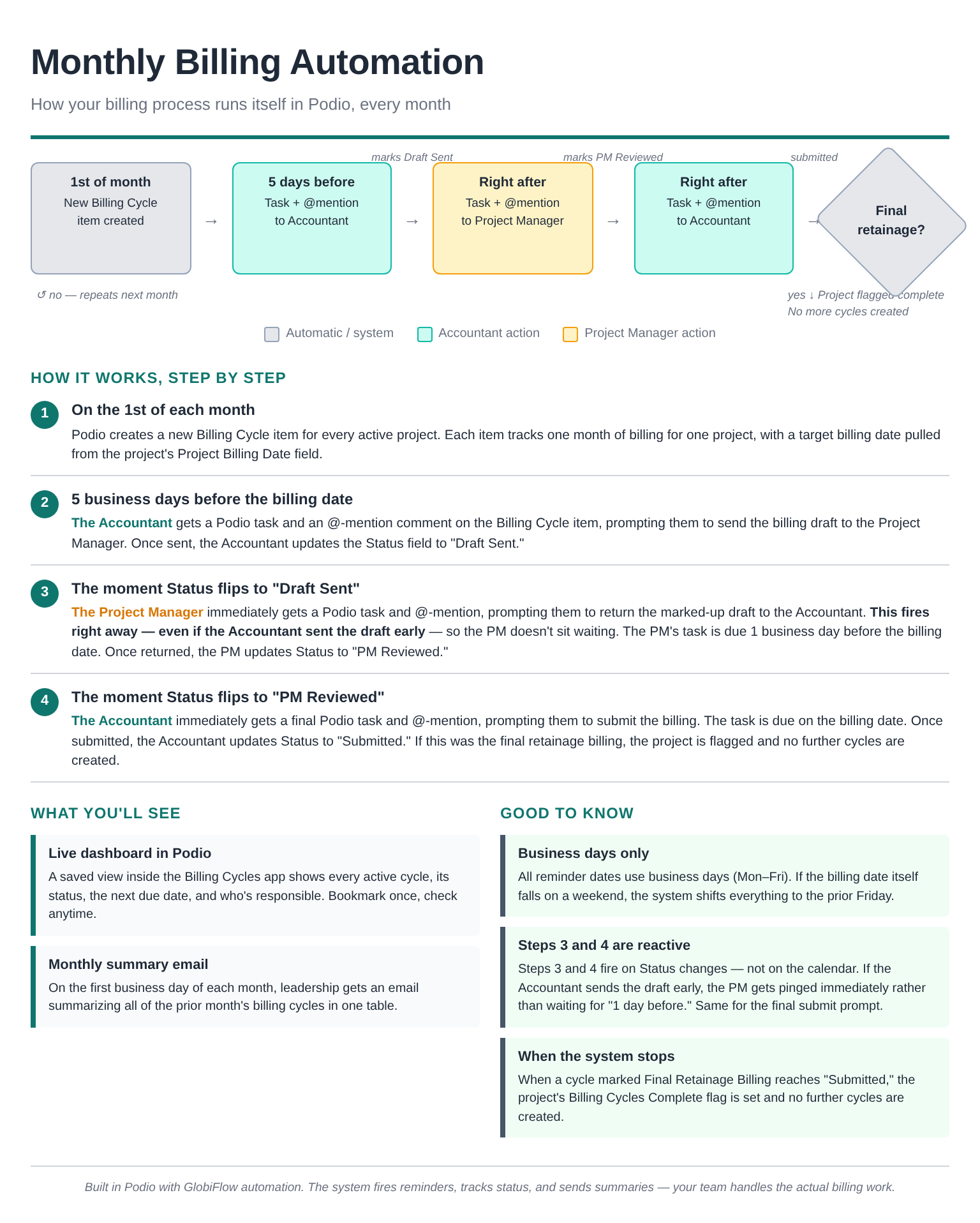
What this gets you
- No more "did anyone start the billing?" — On the 1st of each month, a Billing Cycle item is created for every active project. Nothing falls through the cracks.
- Right person, right time, right place — Each step's @-mention and task lands on the responsible user's Podio dashboard. No status meetings required.
- Audit trail on the Project page — Every status transition posts a non-@-mentioned comment on the Linked Project so anyone reading the Project's activity stream sees a clean history of billing progress.
- Leadership visibility without QuickBooks — A live saved view inside the Billing Cycles app plus a first-of-month digest email gives Justin, Emilina, and Linda full visibility.
Who does what
| Role | What you do |
|---|---|
| Project Manager | Set the project's Billing Date at job setup. Mark up the draft and flip Status to "PM Reviewed" when prompted. |
| Accountant | Send the draft and flip Status to "Draft Sent." Submit the billing and flip Status to "Submitted." Mark Final Retainage Billing? when you create the last cycle. |
| System (Podio + GlobiFlow) | Create the cycle, fire prompts, stamp timestamps, post audit comments, flag the project complete when final retainage is submitted, send the monthly digest. |
Quick navigation
- New to this system? Read How It Works next.
- Setting up a new project that needs billing? See Setting Up a New Project for Billing.
- Something didn't fire when you expected? See Troubleshooting.
Key terms
- Billing Cycle — One record per project per month. Lives in the Billing Cycles app.
- Computed Billing Date — The actual day billing is due for this cycle. Pulled from the Project's Billing Date field and shifted to the prior Friday if it would land on a weekend.
- T-5 Prompt Date — 5 business days before Computed Billing Date. This is when the Accountant gets the draft-prep prompt.
- T-1 Prompt Date — 1 business day before Computed Billing Date. Used as the PM's task due date.
- Status — Where this month's billing is in the workflow. Options: Pending Draft → Draft Sent → PM Reviewed → Submitted. (Or Skipped, if you decide to skip a month.)
- Final Retainage Billing? — A Yes/No checkbox on the cycle. The Accountant flips this when creating the final retainage cycle. When that cycle reaches "Submitted," the project's Billing Cycles Complete flag is set and no further cycles are created.
Related
- How It Works — Step-by-step walkthrough of one month
- Setting Up a New Project for Billing — What the PM has to fill in for cycles to fire
- Dashboard & Monthly Digest — Where to look for status
- Final Retainage & Stopping a Project — How the system knows when to stop
- Troubleshooting — When something doesn't fire