How Stages Work
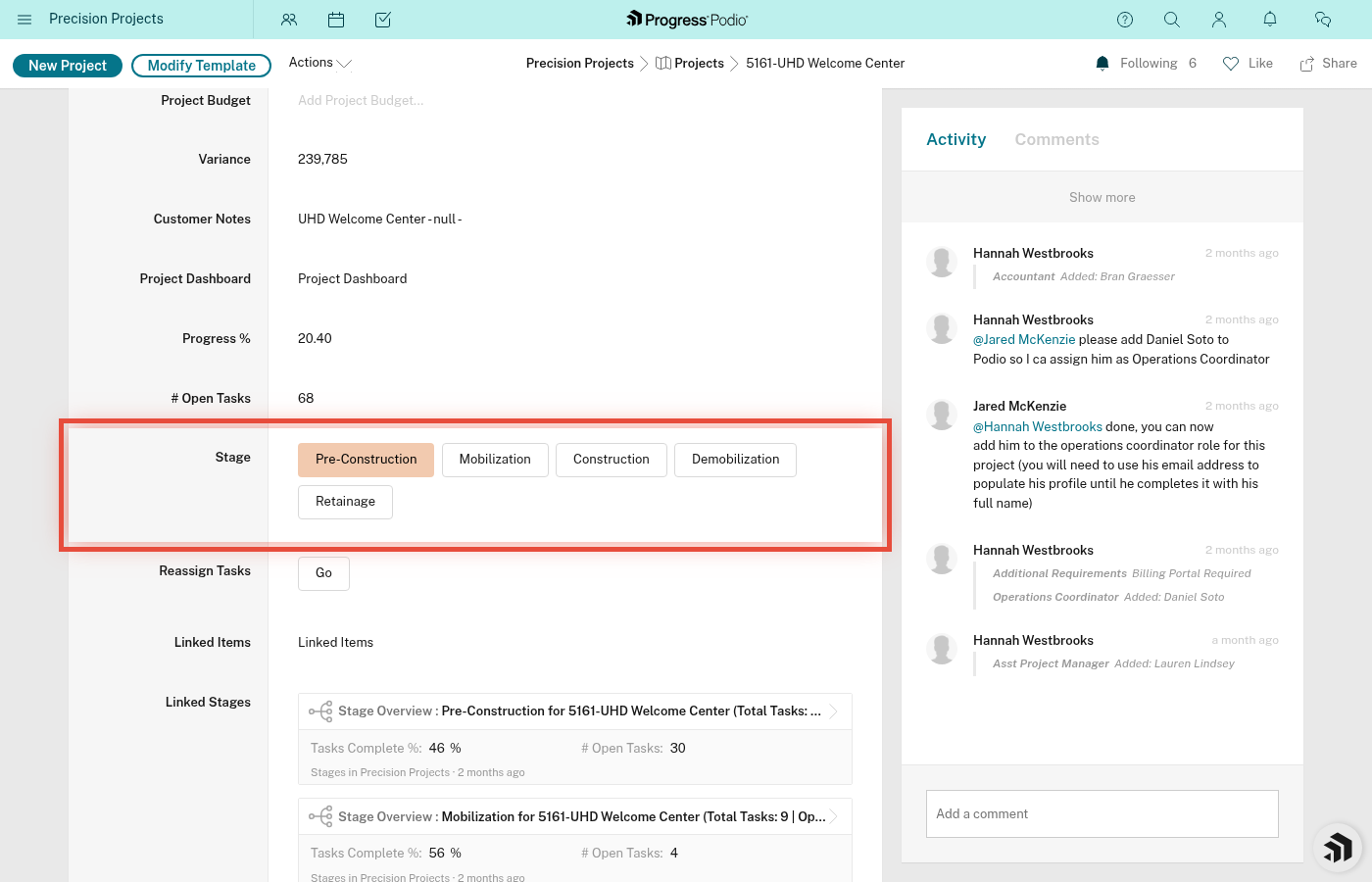
Every project goes through 5 stages, from planning to closeout. Think of stages like chapters in a book — each one has its own tasks, timeline, and goals.
The 5 Stages
Every project follows this path:
1. Pre-Construction (Planning & Prep)
         ↓
2. Mobilization (Getting Set Up)
         ↓
3. Construction (Doing the Work)
         ↓
4. Demobilization (Wrapping Up)
         ↓
5. Retainage (Final Closeout)
You move through them in order. You can't skip stages.
Visual flowchart showing 5 stages in sequence - custom diagram needed
What Are Stages?
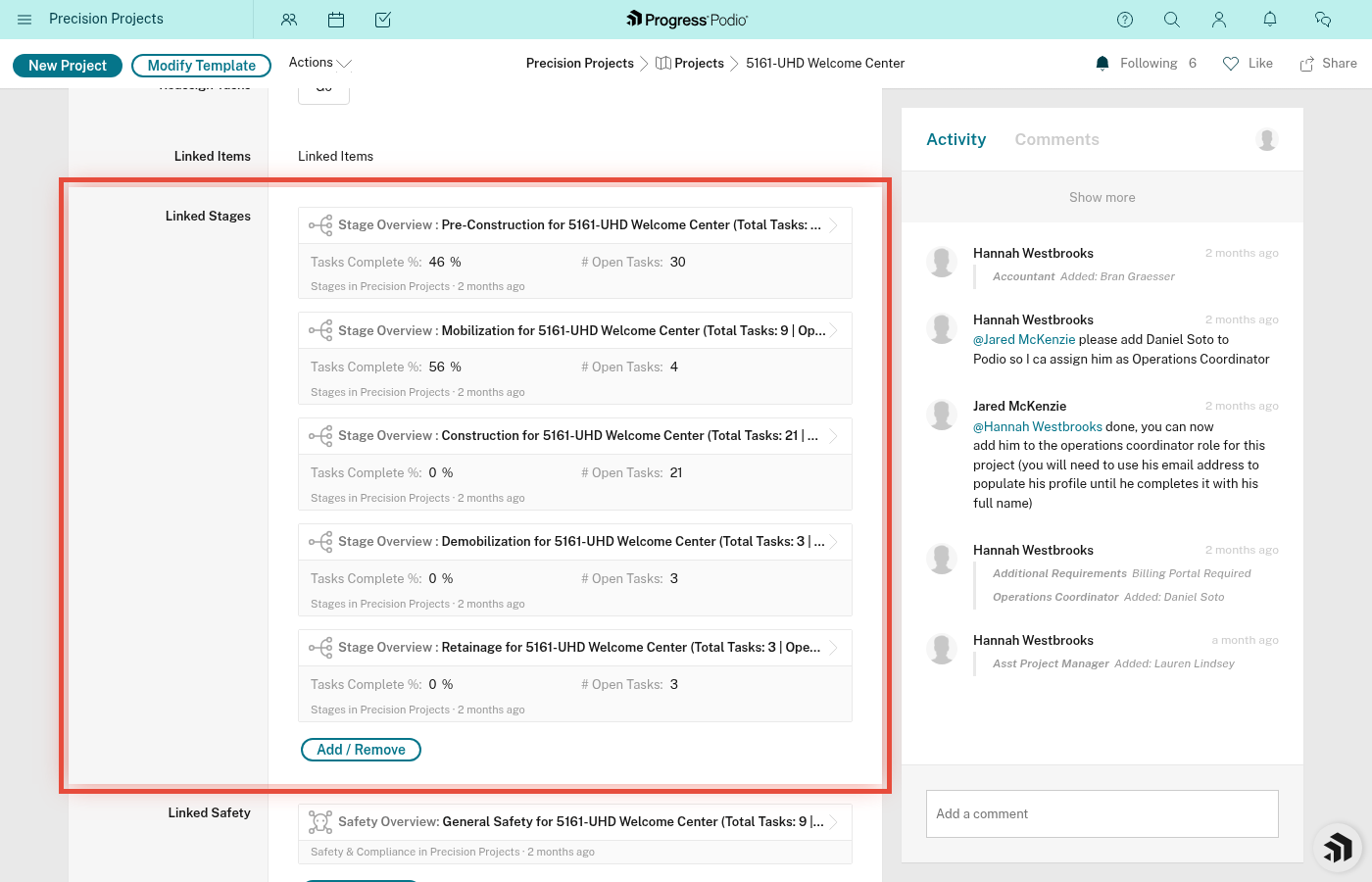
Stages are separate records linked to your project. When you create a project, Podio automatically creates all 5 stage records for you.
Think of them like folders — each stage holds its own tasks, dates, and notes.
How Tasks Work with Stages
All tasks are created automatically when the project is created — not when each stage becomes active.
Here's the magic:
- You set Current Stage Status to "[Stage Name] Active"
- Wait 2-3 minutes
- Tasks for that stage are already created (all tasks are created when the project is created)
- Tasks appear in that stage's Task Overview
Managing the task volume: Since all tasks are created at once, use filters to view only tasks for your current stage. This keeps things focused without overwhelming you.
Stage Breakdown
1. Pre-Construction (The Foundation)
When: Project just started, before any field work
Purpose: Plan, permit, coordinate, and document everything
Duration: Varies (days to weeks, depending on complexity)
% of Total Work: ~75% of project success happens here!
Major activities:
- Contract review
- Permits and compliance (811, badging, SSSP)
- Submittals and RFIs
- Scheduling and coordination
- Document collection
- Safety setup
📍 Most projects spend the longest time here. Don't rush it.
Read more: Pre-Construction Details
2. Mobilization (Getting Ready to Work)
When: After Pre-Con is done, before actual construction starts
Purpose: Get the site, equipment, and crew ready
Duration: Usually 1-3 days
Major activities:
- Site setup (fencing, trailers, utilities)
- Equipment delivery
- Crew assignment and briefing
- Final safety checks
- Material delivery coordination
Read more: Mobilization Details
3. Construction (Doing the Work)
When: Site is ready, crew is on-site
Purpose: Execute the scope of work
Duration: Varies (days to months)
Major activities:
- Daily work execution
- Daily reports
- Safety monitoring
- Progress tracking
- Quality control
- Material management
- Change order tracking
Read more: Construction Details
4. Demobilization (Wrapping Up)
When: Work is done or substantially complete
Purpose: Clean up, return equipment, close out punch list
Duration: Usually 1-2 days
Major activities:
- Site cleanup
- Equipment return
- Punch list completion
- Final inspections
- Crew demobilization
- Document handoff
5. Retainage (Final Closeout)
When: After Demob, waiting for final payment
Purpose: Get paid, close out paperwork, archive project
Duration: Varies (weeks to months, depends on GC payment terms)
Major activities:
- Final billing and invoicing
- Retainage collection
- Warranty tracking
- As-built document submission
- Project archiving
- Lessons learned capture
Advancing to the Next Stage
This is controlled by ONE field: Current Stage Status on the project page.
When you're ready to move to the next stage:
- Open the project
- Change Current Stage Status to the next stage (e.g., "Mobilization Active")
- Save
Tasks for all stages already exist — changing the stage just updates which phase you're tracking as active.
How to View Stage Details
From the Project Page
- Open your project
- Scroll to Linked Stages
- Click on any stage (e.g., "Pre-Construction")
- The stage page opens, showing:
- Stage Name
- Estimated/Actual Dates
- Task Overview (list of tasks for this stage)
- Tasks Complete %
- Open Issues count
- Stage-specific notes
Stage Status Tracking
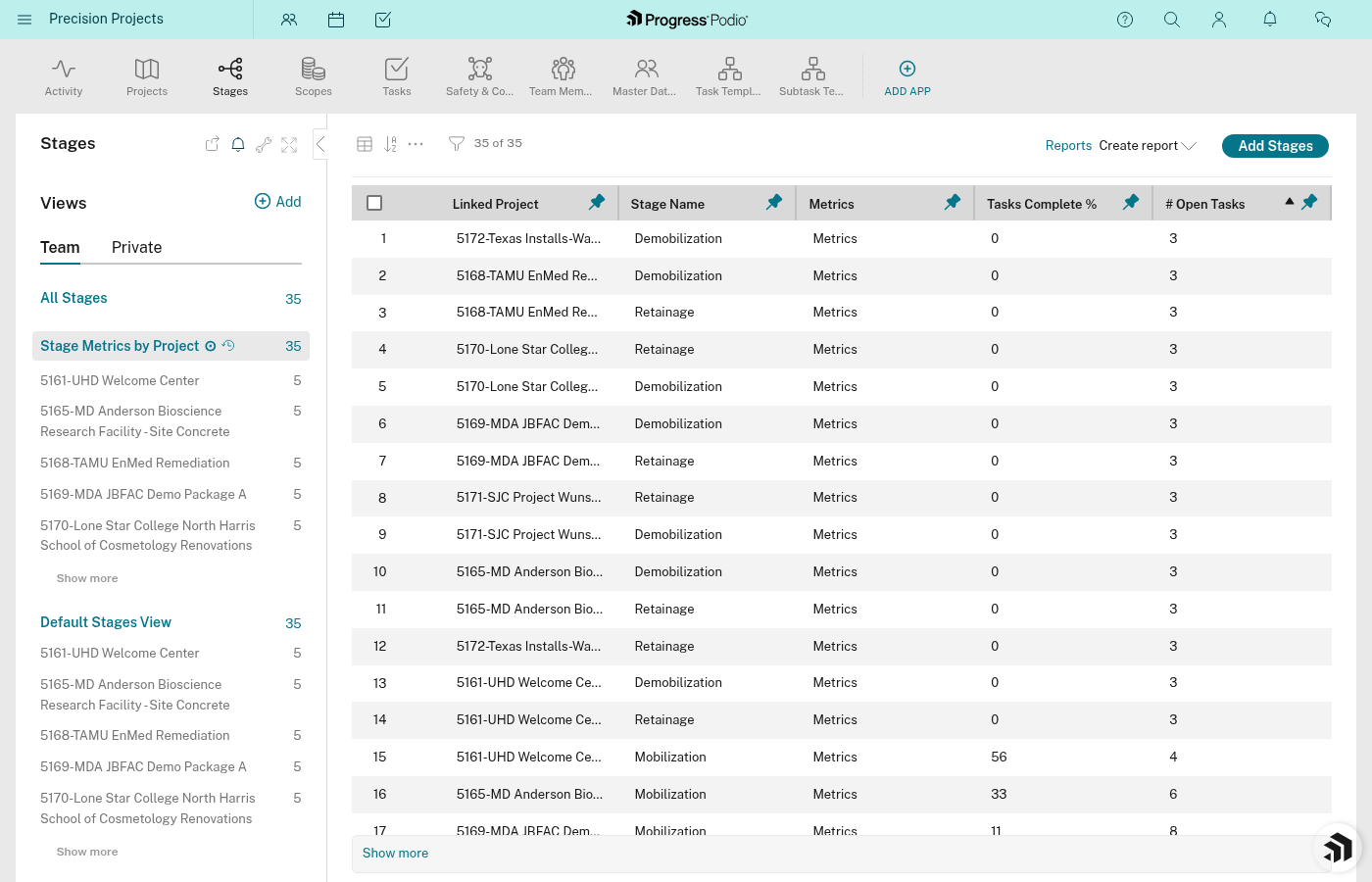
Each stage tracks:
Tasks Complete %
Shows how much of the stage is done. Calculated automatically based on completed tasks.
Example:
- Pre-Construction has 45 tasks
- You've completed 30 tasks
- Tasks Complete % = 65%
Open Issues
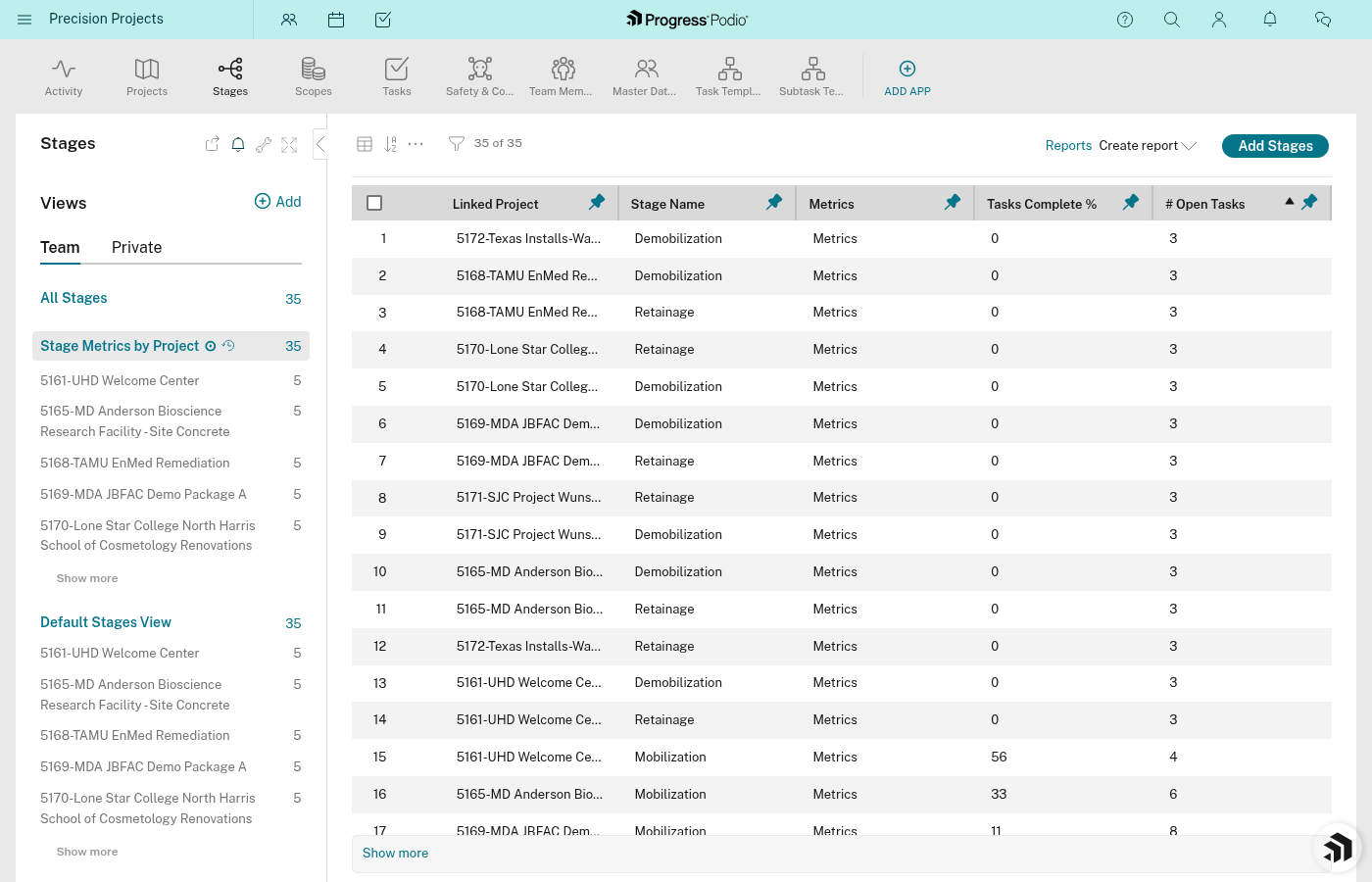
Count of incomplete tasks in this stage.
Example:
- Pre-Construction has 45 tasks total
- 30 are complete
- Open Issues = 16
Use this to see how much work is left.
Estimated/Actual Dates
The actual dates are auto-filled from task completion dates. Estimated dates can be manually entered for planning.
Track when the stage was supposed to start/finish vs. when it actually did.
Stage Specific Notes
Free-text field for any notes specific to this stage.
Use it for:
- Special instructions
- Issues encountered
- Lessons learned
- Anything future-you or the next person needs to know
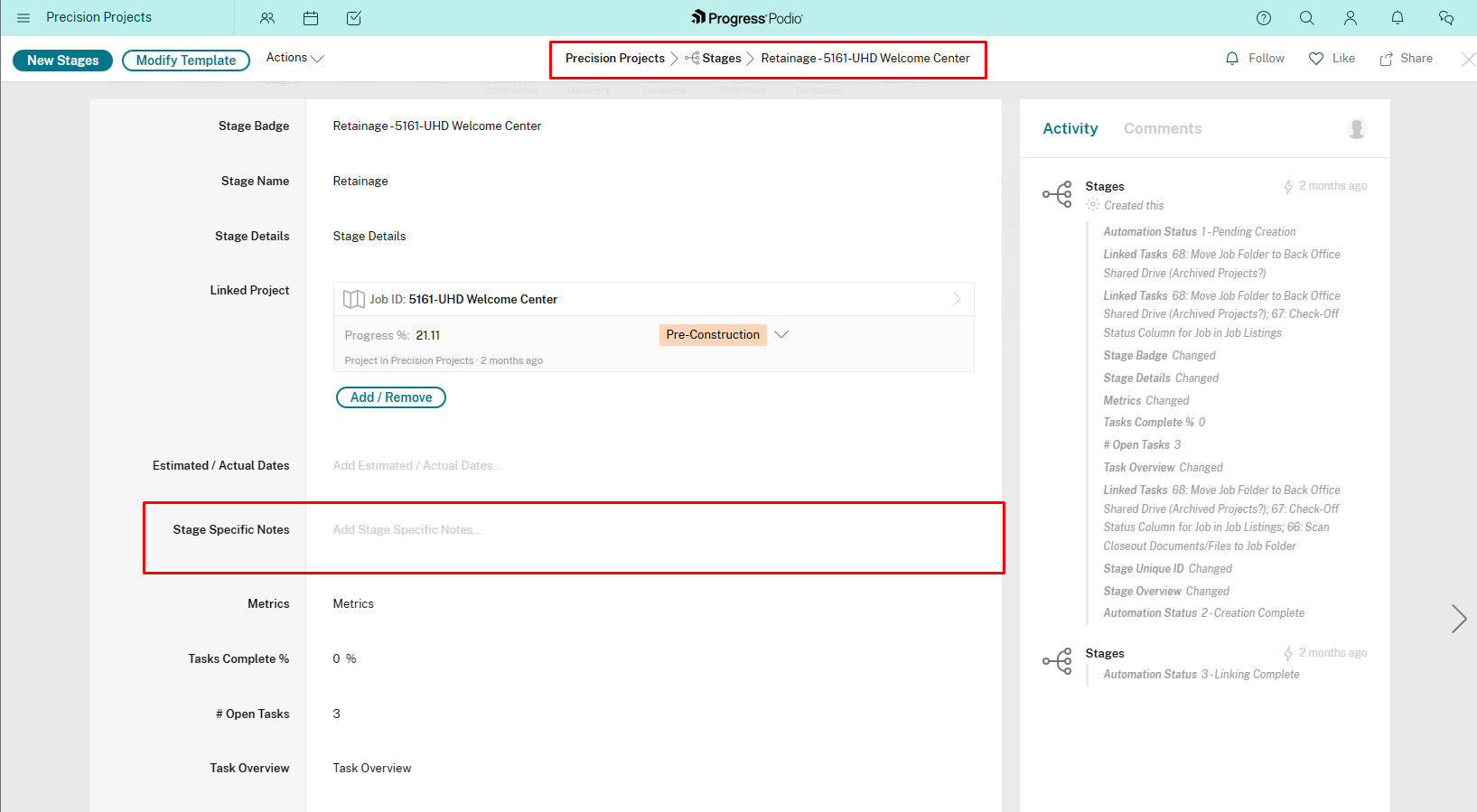
Automation Status Field
Each stage has an Automation Status field (usually hidden from view). This tracks the automation process:
- "1 - Pending Creation" - Tasks are about to be created
- "2 - Creation Complete" - Tasks have been created
- "3 - Linking Complete" - Task dependencies have been linked
You don't need to touch this. It's for the automation system to track its progress.
Common Questions
"Can I skip a stage?"
No. Every project goes through all 5 stages in order. Even if a stage takes 1 day, you still need to activate it.
Why? Each stage has critical tasks (safety, documentation, compliance). Skipping creates gaps.
"Can I go back to a previous stage?"
Technically yes (you can change Current Stage Status back), but it won't delete the tasks you already created.
Better approach: If you need to do more Pre-Con work after starting Mobilization, just create a new task manually in the Pre-Construction stage. Don't mess with the stage status.
"What if I'm in multiple stages at once?"
You're not. Only ONE stage is "Active" at a time (based on Current Stage Status).
But: You can still have open tasks in previous stages. That's normal.
Example:
- Current Stage Status = "Construction Active"
- You're working on construction tasks daily
- But you still have 2 open tasks from Pre-Construction (e.g., waiting on a submittal approval)
That's fine. Finish those Pre-Con tasks when you can. The stage status just controls where the project is "officially" at.
"How long should each stage take?"
Depends on the project. Here's a rough guide:
| Stage | Typical Duration |
|---|---|
| Pre-Construction | 1-4 weeks (varies widely) |
| Mobilization | 1-3 days |
| Construction | Days to months (depends on scope) |
| Demobilization | 1-2 days |
| Retainage | 2-8 weeks (waiting for payment) |
Pre-Construction is the longest because it involves permits, submittals, coordination — things that depend on external parties.
"What if a stage is taking too long?"
Look at Open Issues for that stage. Which tasks are stuck? Why?
Common bottlenecks:
- Pre-Con: Waiting on permits or GC approvals
- Mobilization: Equipment delays
- Construction: Weather, material delays, crew availability
- Demob: Punch list items not addressed
- Retainage: GC payment processing
Identify the blocker and escalate if needed.
"Can I delete a stage?"
No. And don't try. The 5 stages are core to how the system works.
If a stage doesn't apply to your project, you technically can skip it, but you shouldn't — follow the standard procedures and activate each stage in order, completing tasks quickly or marking them N/A if they don't apply.
Tips for Managing Stages
1. Focus on One Stage at a Time
Don't try to work on all stages at once. Finish (or mostly finish) one stage before advancing to the next.
Exception: It's normal to have a few carryover tasks from previous stages while in a new stage.
2. Pre-Construction Is 75% of Success
The better you plan in Pre-Con, the smoother everything else goes. Don't rush it.
3. Use Stage Notes
When weird stuff happens, document it in Stage Specific Notes. Future projects will thank you.
Example:
"GC required additional submittal not in original scope — added task manually. Delayed Mobilization by 3 days."
4. Check Open Issues Daily
Make it a habit to check Open Issues for your active stage. Tackle tasks before they become blockers.
5. Advance Deliberately
Don't advance to the next stage just because you're "mostly done." Finish critical tasks first.
Ask yourself before advancing:
- Are all safety items complete?
- Are all permits/approvals in place?
- Is the team ready?
- Are there any blockers that would prevent the next stage from starting?
If yes to all → advance. If no → finish those tasks first.
Visual Summary
PROJECT CREATED
    ↓
[Pre-Construction Active] ← Start here
    • 45 tasks created (for Concrete division)
    • Plan, permit, coordinate, document
    • When done → Advance to Mobilization
    ↓
[Mobilization Active]
    • Tasks created for Mobilization
    • Set up site, equipment, crew
    • When done → Advance to Construction
    ↓
[Construction Active]
    • Tasks created for Construction
    • Execute work, daily reports, track progress
    • When done → Advance to Demobilization
    ↓
[Demobilization Active]
    • Tasks created for Demob
    • Clean up, return equipment, punch list
    • When done → Advance to Retainage
    ↓
[Retainage Active]
    • Tasks created for Retainage
    • Final billing, closeout, archive
    • When done → Project complete!
Related Docs: