Apps and Items in Podio
What is an App?
Think of an app like a spreadsheet with superpowers. Each app holds a specific type of information—projects in one app, tasks in another, contacts in a third.
But unlike a spreadsheet, Podio apps can:
- Connect to each other (link a task to its project)
- Trigger automations (create tasks automatically when something happens)
- Show different views for different needs
What is an Item?
An item is one entry in an app.
| App | Item Example |
|---|---|
| Projects | "Job #2024-15 - Oak Grove Foundation" |
| Tasks | "Submit concrete mix design" |
| Contacts | "Mike Johnson at Turner Construction" |
| Stages | "Pre-Construction" |
When you create a new project, you're creating one item in the Projects app.
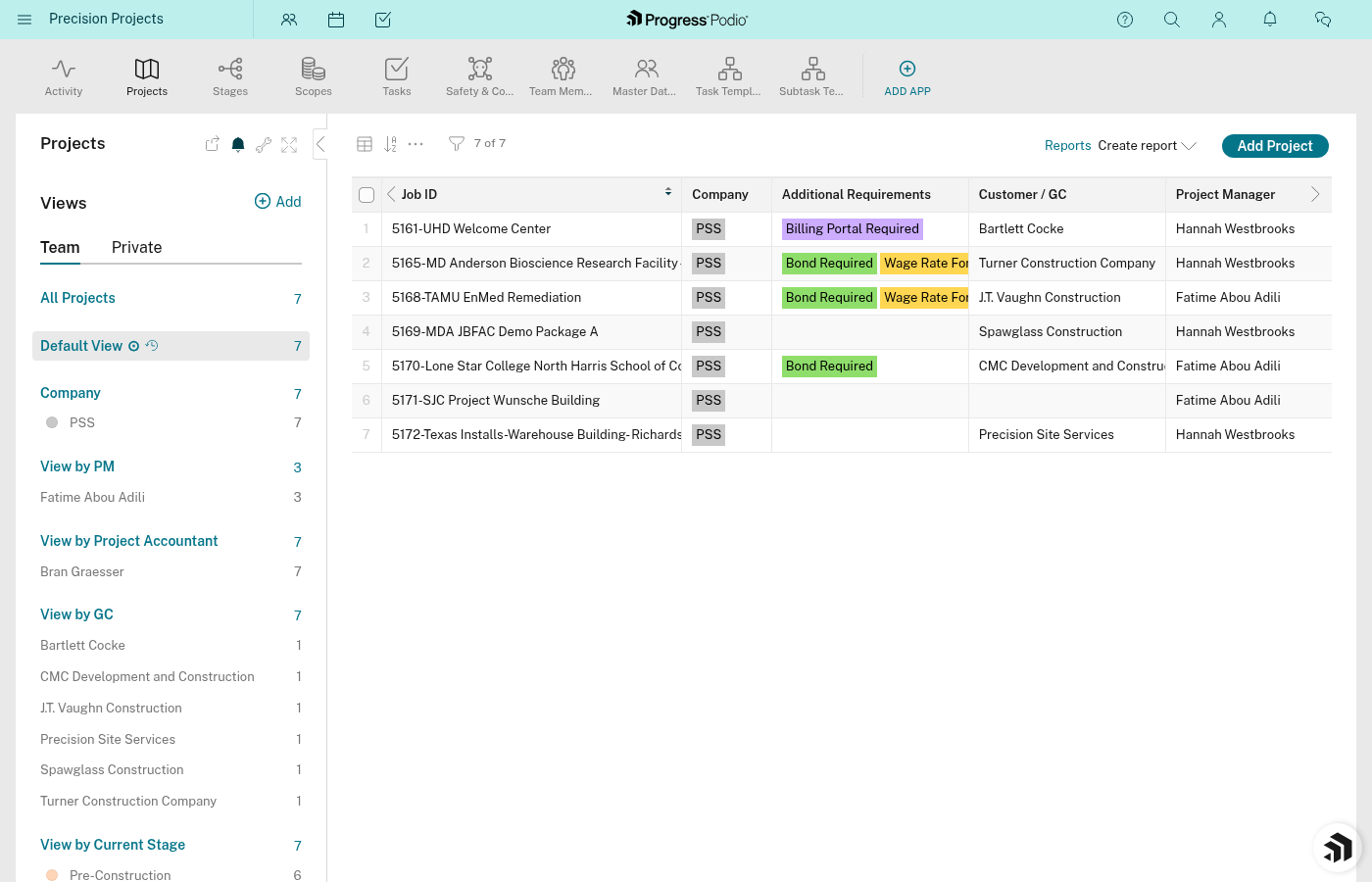
PSS Workspace Apps
Your Precision Projects workspace has 7 apps:
Main Apps (You'll Use Daily)
| App | What It Holds | Who Uses It |
|---|---|---|
| Projects | Every job/project | Everyone |
| Stages | 5 phases per project | PMs, OCs |
| Tasks | Individual to-dos | Everyone |
| Safety & Compliance | Safety tracking (811, Badging, SSSP) | Safety team, PMs |
| Contacts | GC and customer info | PMs, Estimating |
Utility Apps (Behind the Scenes)
| App | Purpose |
|---|---|
| Task Templates | Master list of tasks—automations copy from here |
| Subtask Templates | Subtasks that belong to templates |
You probably won't open the template apps directly. They exist so the system can auto-create tasks for you.
How Items Get Created
There are three ways items appear in Podio:
- You create them manually — Click the + button, fill in fields, save
- Automations create them — When you create a project, stages are auto-created
- Copied from templates — Tasks are built from the Task Templates app
Most of your daily work involves items that already exist. You'll update statuses, add notes, and move things forward.
Quick Reference: Item Counts
A typical project will have:
| App | Items Per Project |
|---|---|
| Project | 1 |
| Stages | 5 |
| Tasks | 40-60+ |
| Safety records | 1+ |
Related Docs:
- Fields and Data — What goes inside each item
- Our Apps Explained — Detailed look at each app
- How Everything Connects — The relationship model