Fields and Data Types
What is a Field?
A field is one piece of information about an item. If an item is like a row in a spreadsheet, fields are the columns.
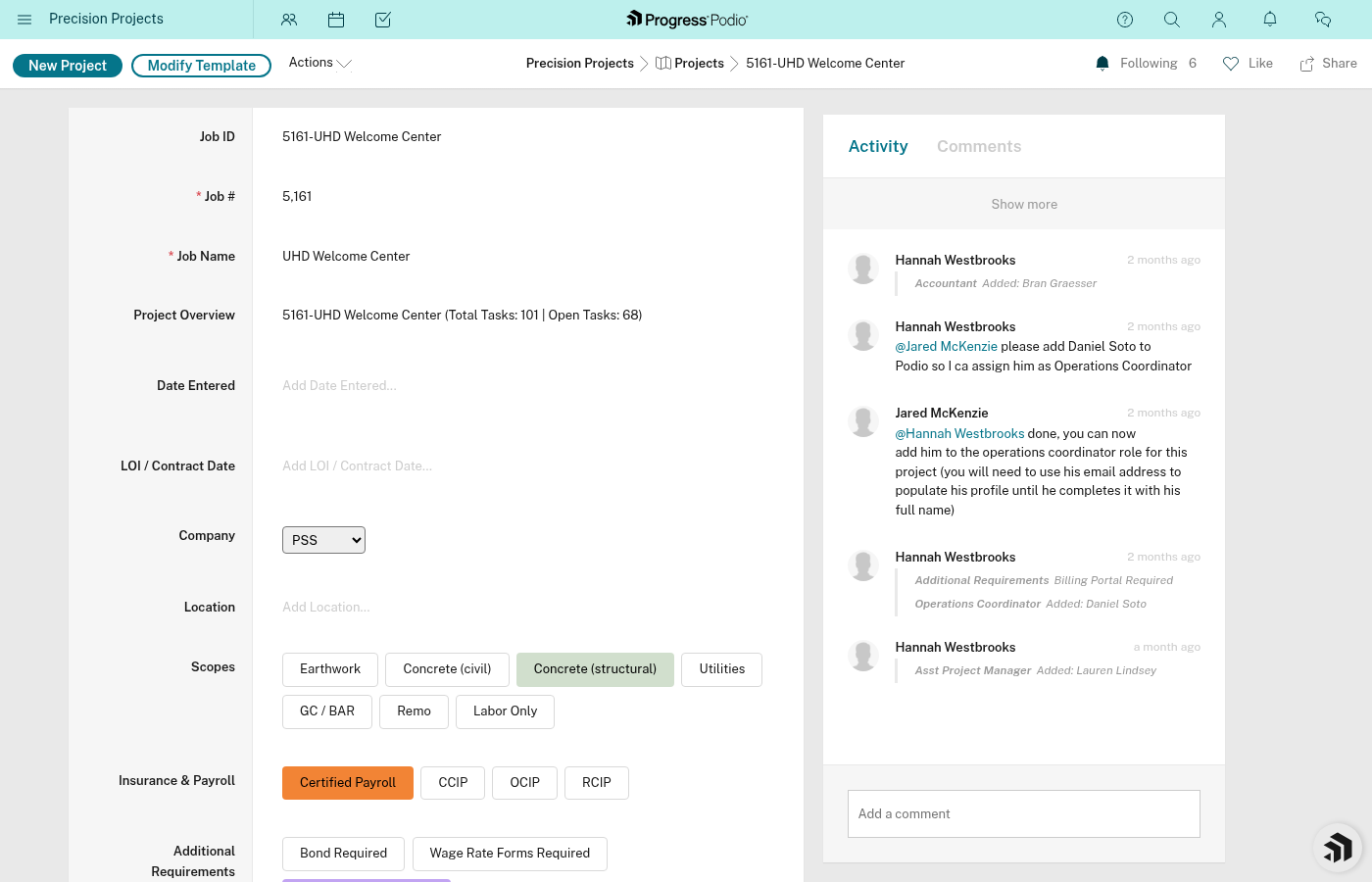
Common Field Types in PSS
| Type | What It Looks Like | Example in PSS |
|---|---|---|
| Text | Type anything | Job Name, Notes |
| Number | Digits only | Job #, Task # |
| Date | Calendar picker | Due Date, Date Entered |
| Date Range | Start and end dates | LOI/Contract Date, Estimated/Actual Dates |
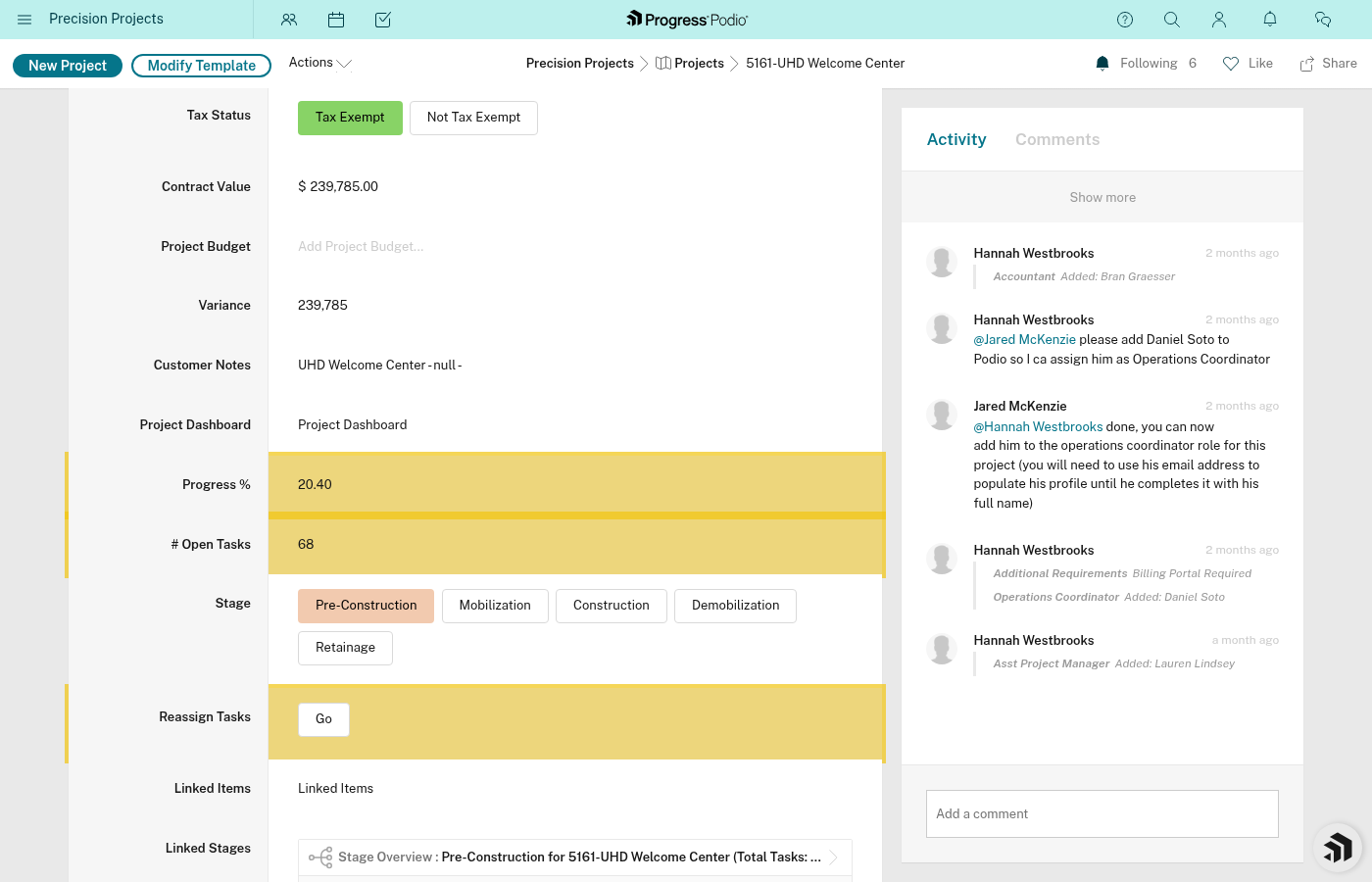
| Money | Dollar amounts | Project Budget, Contract Value |
| Category (Single) | Pick ONE from a list | Current Stage Status, Division |
| Category (Multi) | Pick ONE OR MORE | Scopes (Earthwork, Utilities, etc.) |
| User | Team member picker | Project Manager, Responsible |
| Email address format | Contact Email | |
| Phone | Phone number format | Contact Phone |
| File | Upload documents | Documents & Logs, Attachments |
| Relationship | Links to another app | Customer / GC → Contacts |
| Calculation | Auto-computed | Job ID, Variance, Overall Progress |
Key Fields by App
Projects
| Field | Type | What It's For |
|---|---|---|
| Job ID | Calculation | Auto-generated: "Job # - Job Name" |
| Job # | Number | Unique identifier for the project |
| Job Name | Text | Project name (e.g., "Oak Grove Foundation") |
| Company | Category (single) | Which company/GC |
| Division | Category (single) | Concrete, Drywall, or Other |
| Scopes | Category (multi) | What work types are involved |
| Current Stage Status | Category (single) | Which stage is active right now |
| Project Manager | User | PM assigned to project |
| OC | User | Operations Coordinator |
| FOCS | User | Field Operations Coordinator |
| Foreman | User | On-site foreman |
| Project Budget | Money | Expected costs |
| Contract Value | Money | What you're billing |
| Variance | Calculation | Budget minus actual costs |
Tasks
| Field | Type | What It's For |
|---|---|---|
| Task Name | Text | What needs to be done |
| Status | Category | Pending, In Progress, or Complete |
| Due Date | Date | When it's due |
| Responsible | User | Who owns this task |
| Type | Category | Task, Recurring, or Subtask |
| Ind or Dep | Category | Independent or Dependent |
| Dependencies | Relationship | Which task(s) must finish first |
| Linked Stage | Relationship | Which stage this belongs to |
| Linked Project | Relationship | Which project this belongs to |
Stages
| Field | Type | What It's For |
|---|---|---|
| Stage Name | Text | Pre-Construction, Mobilization, etc. |
| Estimated/Actual Dates | Date Range | When stage should start/end |
| Tasks Complete % | Calculation | Progress through stage tasks |
| Open Issues | Calculation | Count of incomplete tasks |
| Automation Status | Text | Tracks if tasks have been created |
Calculated Fields
Some fields compute themselves. You don't fill them in—Podio figures them out.
| Field | Where | What It Calculates |
|---|---|---|
| Job ID | Projects | Combines Job # + Job Name |
| Variance | Projects | Project Budget minus costs |
| Overall Progress | Projects | Average of stage completion % |
| Open Tasks Count | Projects | Counts incomplete linked tasks |
| Tasks Complete % | Stages | Percentage of complete tasks |
| Open Issues | Stages | Count of incomplete tasks |
Category Options Reference
Current Stage Status (Projects)
- Pre-Construction Active
- Mobilization Active
- Construction Active
- Demobilization Active
- Retainage Active
Task Status
- Pending (red)
- In Progress (yellow)
- Complete (green)
Division
- Concrete
- Drywall
- Other
Scopes
A multi-select field covering the types of work included in the project (Earthwork, Utilities, Foundations, and others — check the live Scopes field in Podio for the current full list).
Task Type
- Task
- Recurring
- Subtask
Ind or Dep (Tasks)
- Independent
- Dependent
Tips for Data Entry
-
Required fields — Some fields must be filled before saving. Podio will tell you which ones.
-
User fields — Start typing a name and Podio will suggest matches from your team.
-
Relationship fields — These pull from another app. The item must already exist there.
-
Multi-select categories — You can pick more than one. Great for Scopes where a project might have Earthwork AND Utilities.
-
Don't touch calculations — They update automatically. You can't (and shouldn't) edit them directly.
Related Docs:
- Apps and Items — The containers that hold fields
- Our Apps Explained — Field usage in context
- Views and Filters — Finding items based on field values