Cost Codes
Cost codes are how the dashboard tracks spend at a finer grain than categories. If you've ever seen "Missing Cost Codes" in the Action Queue and wondered what a cost code actually is, this page is for you.
You don't need to memorize cost codes. The dashboard always shows the description next to the code, and when you fix a missing code in the Action Queue, you pick from a list — you don't type from memory.
What a cost code is
A cost code is a short identifier — something like 03-300 or 01-010 — that labels what specific work a cost relates to. Every PO line and every labor entry gets one. The code has a description attached, which the dashboard shows alongside it (for example, 03-300: Cast-in-place concrete).
Where a category answers the broad question "what kind of cost?" (Concrete, Material, Labor), a cost code answers the more specific one: which kind of concrete work, or which kind of labor.
Why cost codes exist
Categories alone aren't granular enough. "Concrete" tells you a cost is concrete-related, but it doesn't tell you whether the cost is for ready-mix delivery or for the labor placing the concrete on the slab — and on a real job, those are different lines that PMs and accounting want to track separately.
Cost codes give you that granularity, which then powers:
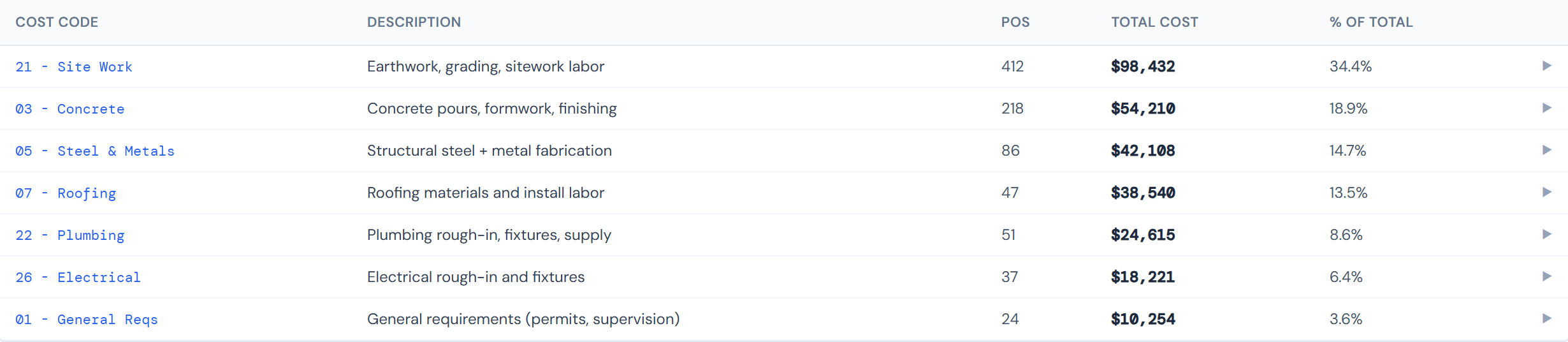
- The Cost Codes breakdown view inside each job, where you can see total spend per cost code
- Budget vs. Actual variance at the cost-code level — clicking the expand arrow on a category row drills into the codes inside it
- Drill-downs in spend widgets that group or filter by cost code rather than category alone
Where cost codes come from
The full cost-code catalog lives upstream, in the accounting system. The JCI dashboard reads a nightly snapshot of that catalog — so if a code is added, renamed, or retired upstream, you'll see the change in JCI by the next morning.
You can't create or edit cost codes from the JCI dashboard. The catalog is read-only here. If a code is wrong, missing from the catalog, or you need a new one added, contact the team that maintains the upstream catalog. JCI just reflects what's there.
Cost code versus category
| Category | Cost code | |
|---|---|---|
| Granularity | High-level | Fine-grained |
| Count | 7 (PO side) or 9 (budget side) | Many |
| Examples | Concrete, Material, Labor | 03-300: Cast-in-place concrete, 01-010: Job supervision |
| Where assigned | Tagged as the line lands | Tagged with the line, or fixed later if missing |
Every cost code is mapped to a category (and to a PM Sheet budget category). That's how rollups work: you enter a budget at the 9-category level, POs land at the 7-category level, and cost codes bridge between them so Budget vs. Actual adds up correctly. For more on the two category systems, see Categories.
Cost codes apply to labor too — not just materials and POs. Labor entries from clock-in carry cost codes the same way PO lines do. So when something needs a cost code fixed, it might be a labor entry, not a purchase.
Code format
The format isn't strict — most codes follow a XX-XXX shape, but not all of them do. Don't read too much into the digits. Use the description that travels with the code as the source of truth.
If you're curious, the full catalog is visible in the dashboard wherever you'd pick a cost code (such as the picker on the Missing Cost Codes tab). It's not worth republishing here because the catalog evolves and any list we wrote down would go stale.
"Missing cost codes" — what that means
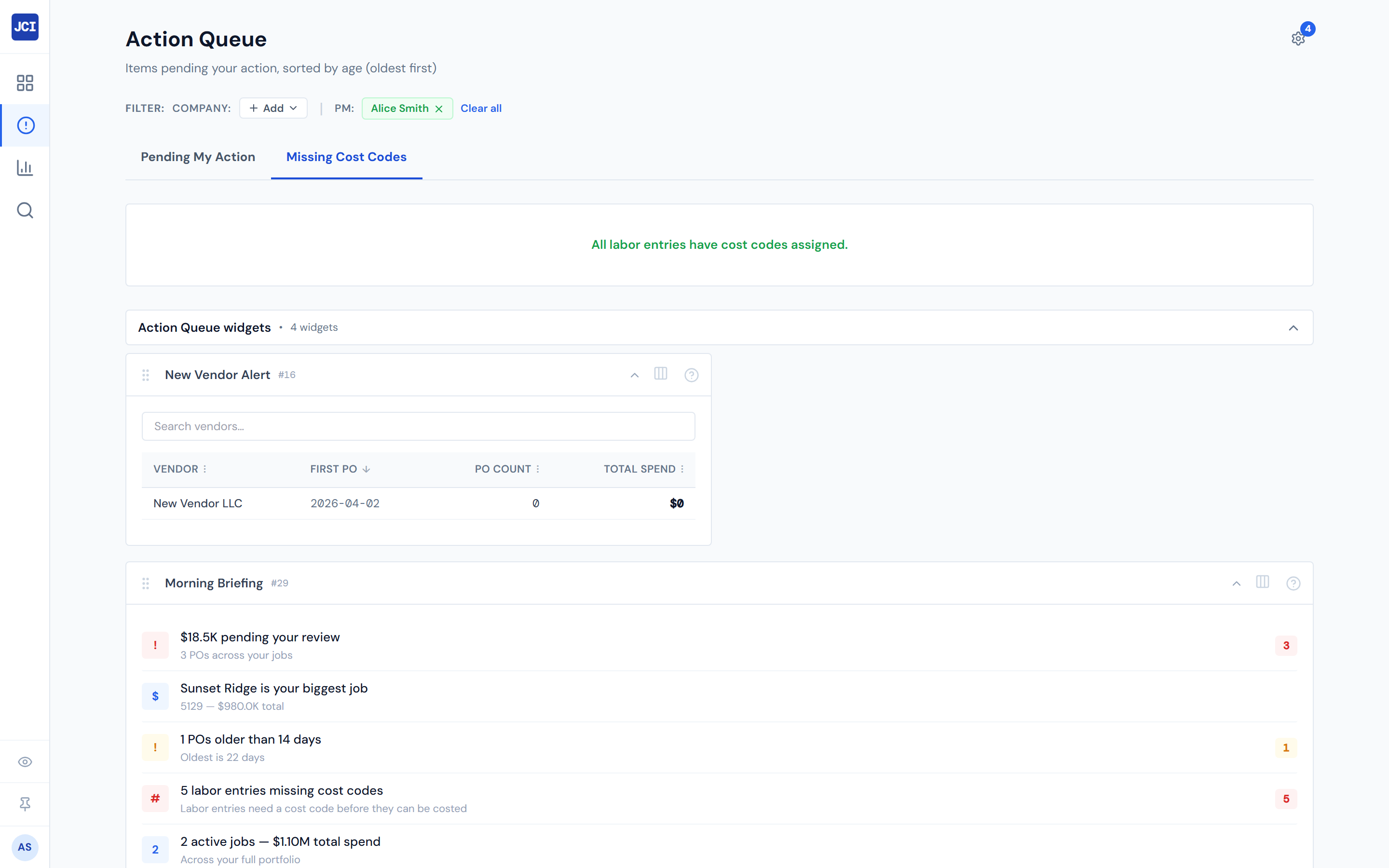
The Action Queue has a dedicated Missing Cost Codes tab for PO lines and labor entries that landed in the system without a cost code assigned. There are two common reasons a line ends up missing a code:
- The uploader (whoever entered the PO or clocked in the labor) didn't tag it.
- The system tried to auto-assign a code based on metadata but couldn't figure out a confident match.
Either way, the line shows up on the Missing Cost Codes tab so a PM can pick the right code from the list and apply it. For the step-by-step, see Fixing a Missing Cost Code.
Where you'll see cost codes
Cost codes show up across several parts of the dashboard:
- Job Detail → Field Data → Cost Codes — the main per-job breakdown view
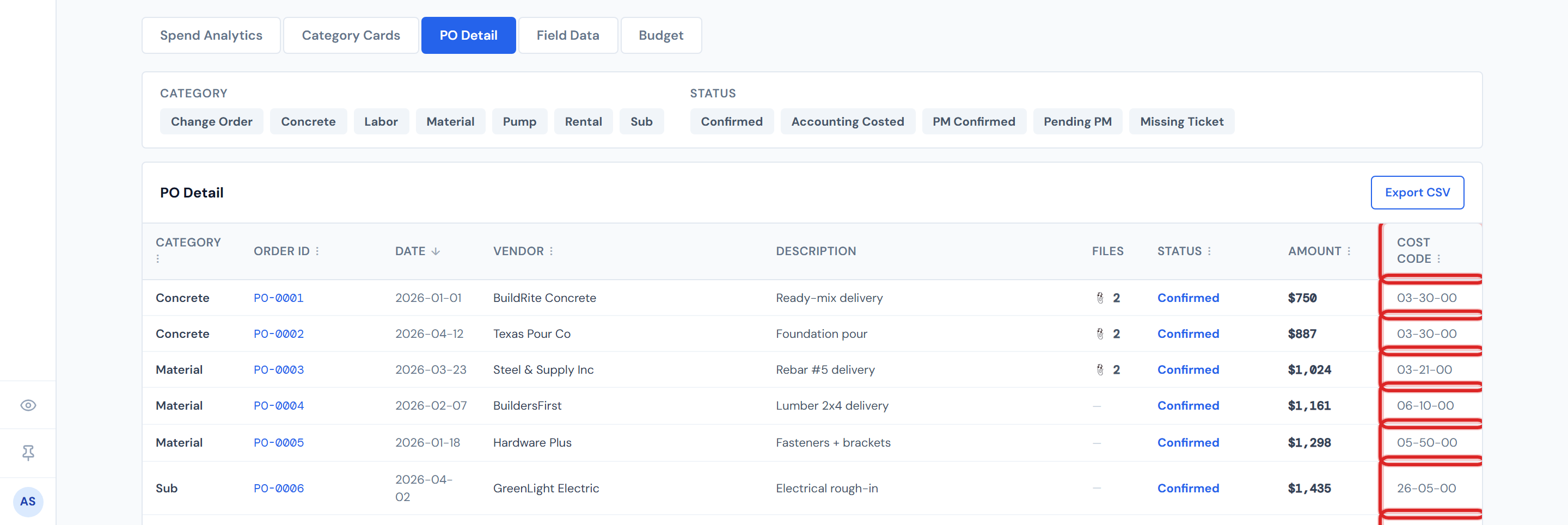
- Job Detail → PO Detail tab — Cost Code column on each row
- Job Detail → Budget tab → Entry — budget is entered at the category level, but the actual costs that compare against it roll up from the cost-code level
- Action Queue → Missing Cost Codes — where you fix lines that landed without a code
- Spend widgets — particularly the Cost Code Treemap
You don't enter budgets at the cost-code level
A small but important distinction: when you enter a budget on a job, you do it at the 9-category level, not at the cost-code level. The dashboard rolls actual spend up from cost codes to those nine buckets so that Budget vs. Actual compares apples to apples. You can drill into any category row to see the cost-code-level breakdown, but you don't enter dollar figures per code. See Budget Entry for the entry workflow.
Related pages
- Categories — how cost codes roll up to the 7 PO categories and 9 budget categories
- Change Order Terms — change orders also carry cost codes
- Missing Cost Codes (Action Queue) — the action tab for fixing missing codes
- Fixing a Missing Cost Code — step-by-step playbook
- Cost Codes (Field Data) — the per-job breakdown view
- Budget Entry — how cost codes relate to budget entry
- Glossary — Cost Code, Category, Missing Cost Code