Cost Codes
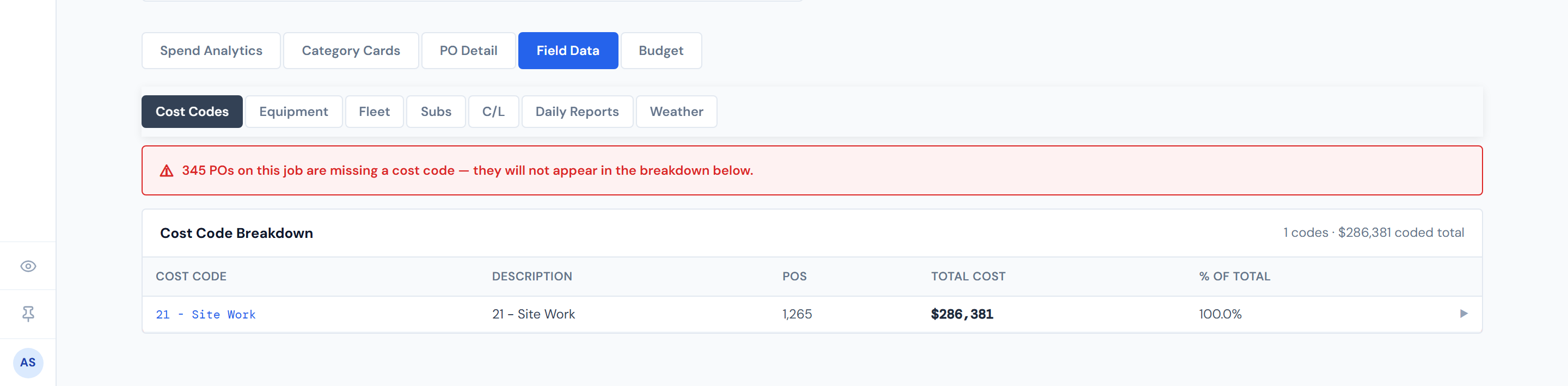
The Cost Codes sub-tab inside Field Data answers a single question: where is this job's money going at the cost-code level? Every coded purchase order rolls up into one row per cost code, ranked by spend, with a click-to-expand drill-down to the actual POs behind each row.
This is the bridge between the high-level category cards on the Job Detail header and the per-PO detail in the PO Detail tab — the place to go when a category looks heavy and you want to know which specific cost code is driving it.
Click any row to see the POs behind it. The summary table is fully interactive — most readers don't realize until they're told.
What the summary table shows
One row per cost code on this job, sorted by total cost descending.
| Column | What it is |
|---|---|
| Cost Code | The code itself — numeric or alphanumeric |
| Description | The human-readable name from the cost-code reference; falls back to the raw code if no description is on file |
| POs | Count of purchase orders carrying this code on this job |
| Total Cost | Summed resolved cost across those POs |
| % of Total | Share of the coded total this code represents |
For background on the cost-code system itself — numbering conventions, who maintains the reference list, how codes route into categories — see Cost Codes overview.
Expanding a row
Click any row to expand a child table of the actual POs behind that cost code's total. The drill-down shows order ID, date, category, vendor, description, status badge, and cost. Click the row again to collapse it. Only one row is open at a time — opening a second collapses the first.
The status badge in each drill-down row uses the standard five-color lifecycle. See PO Lifecycle Colors for the legend.
The (Missing cost code) row
When a job has POs that came through with no cost code, they collapse into a single (Missing cost code) row in the summary. That row often sits at the top of the table — uncoded labor frequently dominates a job's spend, and the table is sorted by total.
This row exists so the cost total stays honest. But those POs won't fix themselves.
Uncoded dollars are real and need cleanup. The fix lives upstream of JCI in the timeclock app — see Missing Cost Codes for the queue surface and Fixing a missing cost code for the step-by-step.
The red banner above the table
When the job has any POs missing a cost code, a red alert banner appears above the summary reading "X PO(s) on this job is/are missing a cost code — they will not appear in the breakdown below." It's a top-of-page heads-up so PMs can see the issue without scrolling for it.
The banner count and the (Missing cost code) row count are computed independently. So if you've drilled into a different code that hides the bucket from view, the banner can still display the full uncoded count. They aren't always the same number — that's by design, not a bug.
How the Category column is decided
The same cost code can ride on POs of different categories — Concrete, Material, Sub, and so on. The Category shown in the drill-down reflects this code's dominant use on this job: the category of the highest-spend PO carrying that code.
Two PMs comparing the same cost code on different jobs can legitimately see different categories — because the dominant use depends on which POs landed where. This is intentional. Don't treat it as inconsistency.
Pump rows always read $0
Pump-category POs exist, but their dollar amounts aren't populated in source data — they're always zero. If you see a Pump row in the drill-down at $0, that's expected, not missing data. See Categories for the full picture.
Pumps are a known $0-by-design category. If a row's category is Pump and the cost is $0, nothing is broken.
How fresh the numbers are
Cost code rollups come from the same source as the rest of the dashboard's PO numbers, on a four-hour refresh cadence. So a PO confirmed within the last few hours may not yet be reflected here. See Data refresh rates for the full picture.
What this page does not show
This is the dollars-by-code view. Hours-by-worker for uncoded labor lives on the sibling C/L sub-tab. The per-PO browsing surface is the PO Detail tab. And the chart-based version of this same data is the Cost Code Treemap widget.
Related pages
- PO Detail tab — one-PO-at-a-time browsing across the whole job
- Subs — the same spend rolled up by vendor instead of by code
- C/L (Crew & Labor) — where uncoded labor hours live
- Missing Cost Codes — the queue surface for remediation
- Fixing a missing cost code — step-by-step playbook
- Cost Codes overview — the cost-code system itself
- PO Lifecycle Colors — for the status badges in the drill-down
- Data refresh rates — how stale the numbers can be
- Glossary — entries for "Cost code," "(Missing cost code)," and "Resolved cost"