Tracking Billing and Retainage
At month-end, you add one billing period per job: how much you billed (the payapp), how much was held back as retainage, and any notes. The dashboard totals the numbers and tells you how far through the contract you are.
This is finance-flavored work that happens once per job per month. The full Billing reference is at Budget → Billing; this page is the workflow narrative on top of it.
When this happens
Most teams do this once per calendar month, after the month closes and the payapp goes out. If your team bills mid-month, that's fine — the period format is YYYY-MM, so each month gets exactly one row per job.
You cannot have two periods for the same job in the same YYYY-MM. The dashboard returns an error if you try.
The seven-step flow
1. Open the job and switch to the Billing sub-tab
Job Detail → Budget tab → Billing. The Billing sub-tab sits next to Entry and vs Actual.
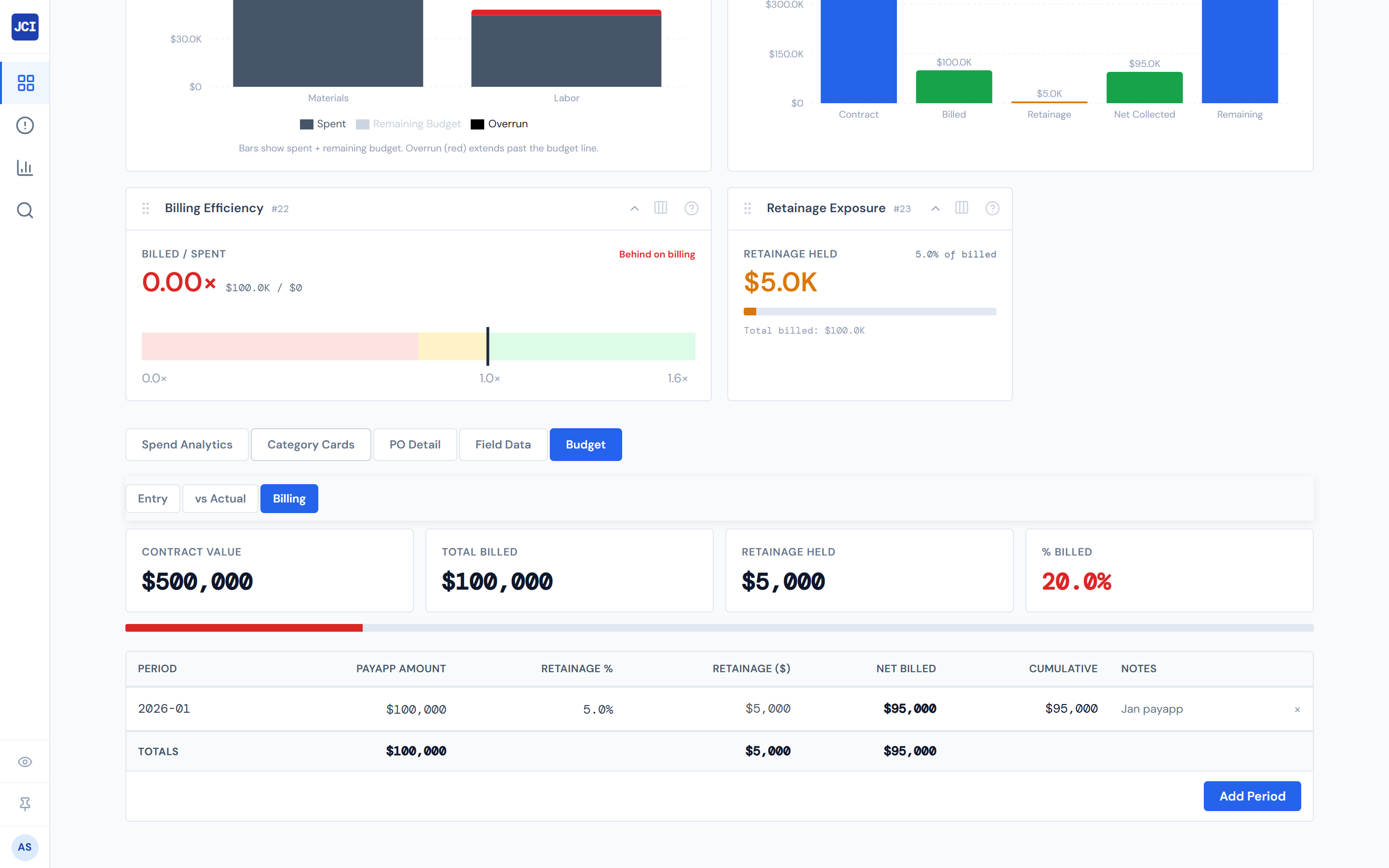
2. Glance at the four scorecards across the top
| Scorecard | What it shows |
|---|---|
| Contract Value | The contract dollar amount. Read-only here — owned on Entry. |
| Total Billed | Sum of payapp amounts across all periods you've entered. |
| Retainage Held | Sum of retainage withheld across all periods. |
| % Billed | Total Billed ÷ Contract Value, with a colored progress bar. |
The % Billed bar's color tells you the job's billing pace at a glance: green at 80% or above (mostly billed), amber between 40 and 79% (in flight), red below 40%.
3. Click "+ Add billing period"
A modal opens with four fields:
| Field | Behavior |
|---|---|
| Billing period (YYYY-MM) | Auto-suggests the month after your latest existing period. Usually you don't type anything. |
| Payapp Amount (dollars) | The gross amount you billed for this period. |
| Retainage % | Defaults to 5. Change it if your contract is different. |
| Notes (optional) | Anything you want to remember about this period. |
As you type the payapp, a live preview shows the calculated retainage dollar amount.
Skip the typing — the modal already filled in the next month after your latest entry.
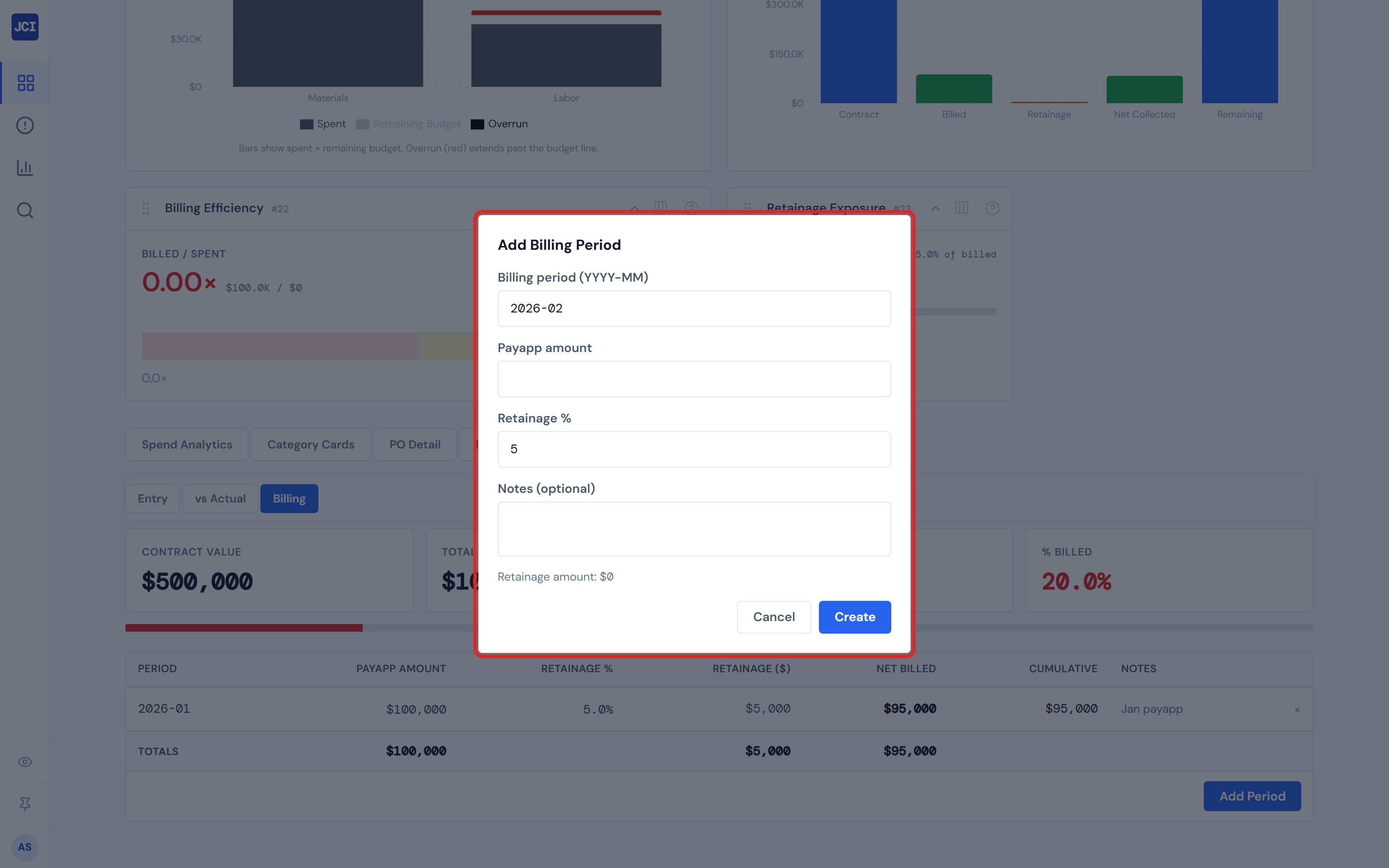
4. Confirm the math, then click Save
The new row appears in the periods table below in chronological order. The Cumulative column updates automatically — it's a running sum of net billed (payapp − retainage) across all periods. The four scorecards refresh.
5. Edit a row inline if needed
Payapp Amount and Retainage % cells are click-to-edit. Click the cell, change the value, press Enter. The row's Net Billed and the Cumulative for that row and all later rows recalculate instantly.
The other columns (Period, Retainage $, Net Billed, Cumulative) are computed — you don't edit them directly.
6. Delete a row in two clicks
Click the × at the right end of the row. It expands to show Confirm and Cancel. Click Confirm to actually delete.
This is intentional, not a bug. A mis-clicked delete on a billing period would reshape the cumulative balance — the dashboard makes sure you mean it.
A misclick doesn't reshape your cumulative balance. Click × → Confirm to actually remove the row.
7. Sanity-check the % Billed bar
If you billed $50K this month on a $500K contract, the bar should jump roughly 10% (subject to retainage adjustments). If it doesn't, your Contract Value on the Entry tab may be wrong — go back and check it.
Reading the cumulative balance column
The Cumulative column is a running total of net billed (after retainage withhold) across all periods in chronological order. It's what the customer has paid you to date — not counting retainage release.
Use it as your "where am I" number when reconciling against AR.
Use Total Billed if you want the gross invoice number. Use Cumulative if you want net-of-withhold. Neither is "actually received" — see the next section.
Retainage release is not in this tab
The Retainage Held scorecard only shows what's been withheld across the periods you've entered. If retainage gets released later (typically at substantial completion), that release is not yet modeled in the Billing tab.
The dashboard does not have a "retainage released" event you can record on a billing period. If your contract releases retainage at substantial completion, that release lives outside JCI for now. Confirm with your team how they reconcile released retainage against AR.
The duplicate-period error
If you try to add a second period for the same job in the same YYYY-MM, the dashboard returns an error — the table only allows one row per job-month combination.
The error appears as a red banner at the top of the page or as an inline error in the modal. Resolve it by editing the existing row instead of adding a new one.
Adding a duplicate YYYY-MM fails. Edit the existing row instead.
Format pitfalls
Things that fail validation, and what works:
| Pitfall | Works | Doesn't work |
|---|---|---|
| Period format | 2026-04 | 04-2026, 2026/04, April 2026 |
| Payapp sign | 0 or any positive number | Negative values (refunds need a different process) |
| Retainage % | 5 (means 5%) | 0.05 (means 0.05%, not 5%) |
The regex is strict. Any other format fails validation. Readers will try 04-2026 first; help them out before they file a ticket.
For a refund or reversal, track it in Notes and file the actual reversal outside JCI — the Billing tab doesn't model negative payapps.
A few things to know
- No bulk import. There's no "import billing periods from CSV" today. If you need to seed historical periods on a job that's been running for a year, you add them one at a time.
- Billing edits are immediate; cost data is not. Billing is app-owned and updates instantly when you save. Cost numbers on the vs Actual sub-tab and elsewhere lag up to four hours. So a job may show a fresh billing period and slightly stale actuals at the same time — that's expected. See Data Refresh Rates.
- Retainage defaults to 5%. Most contracts use 5%. If yours is different, change it in the modal — and remember to change it on subsequent periods too. The default applies every time you open the modal.
- Contract Value lives on Entry, not here. The Billing scorecard for Contract Value is read-only. If the % Billed bar looks wrong, the contract value on Entry is the first thing to check.
What's next
- New job that doesn't have a budget yet? Start with Entering a Job Budget — Billing reads contract value from Entry.
- This is part of the broader month-end pass? See Month-End Review.
- Spotting variance issues during the review? See Spotting Overruns and Budget vs Actual.
- Curious about which jobs you're scoped to during the review? See My Jobs Toggle.