Budget Tab
Budget is the fifth and final main tab on Job Detail. It bundles three sub-tabs about the dollar plan and dollar progress for this job: where you enter the planned budget, where you compare planned to actual spend, and where you track billing periods. Pick a sub-tab to drill in.
This page is the landing tour. Each sub-tab has its own page — see the table below.
Where it lives
Fifth and last main tab on Job Detail, after Field Data. When Budget is the active tab, a sub-tab bar appears just below the main tab bar. Both bars are sticky — they pin to the top of the viewport when you scroll.
The three sub-tabs
In screen order, with the on-screen label and a one-sentence purpose:
| Sub-tab | What it covers | Read more |
|---|---|---|
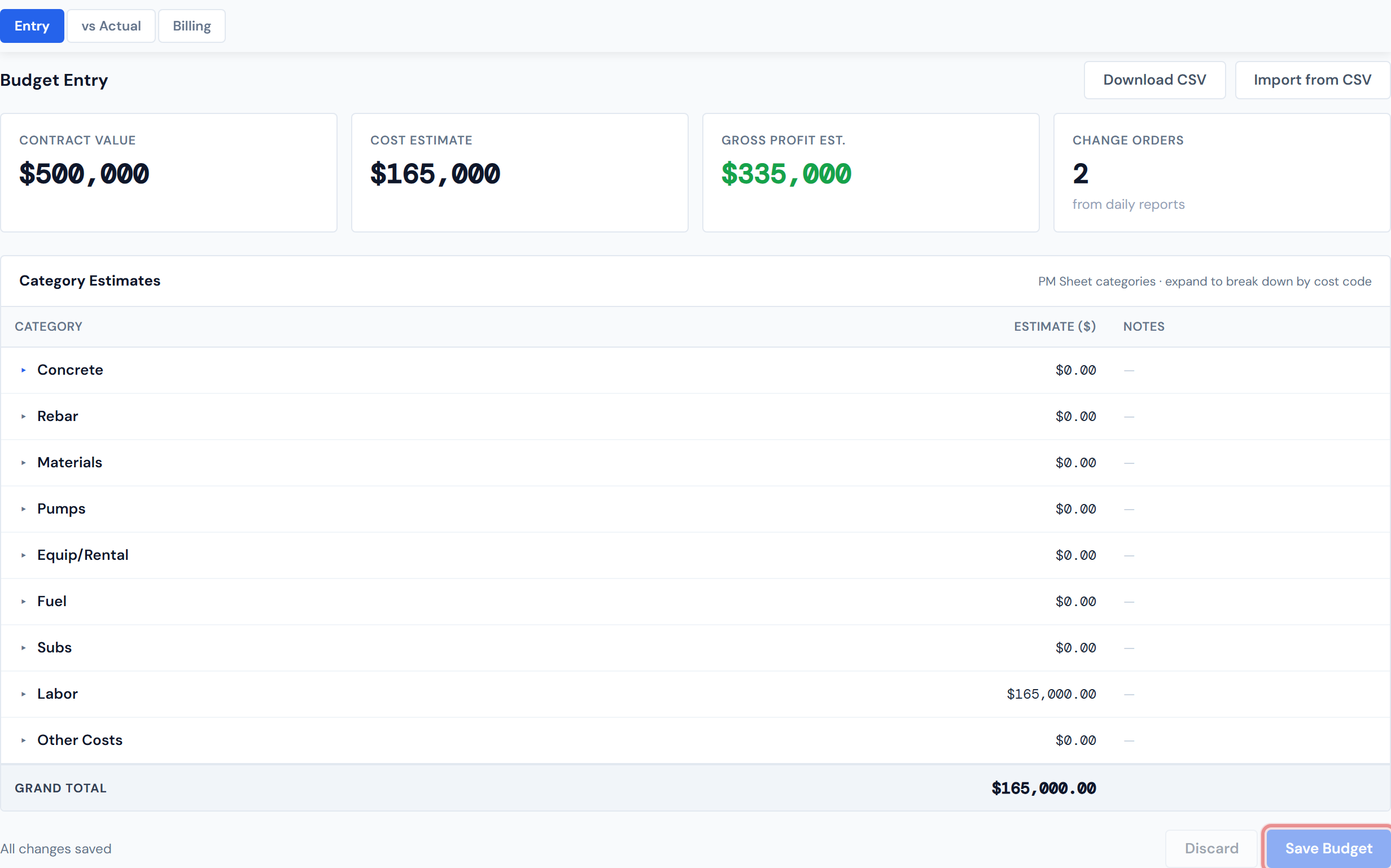
| Entry | Enter or edit the planned budget for this job, broken down by category and cost code. Also captures the contract value and gross-profit estimate. | Budget Entry |
| vs Actual | Compare the planned budget against actual PO spend so far, with variance highlighting. | Budget vs Actual |
| Billing | Log billing periods (invoices billed to the customer) with retainage and a running cumulative balance. | Billing |

Entry stays mounted in the background
Switching from Entry to vs Actual or Billing and coming back? Any unsaved edits in the Entry view are still there. The other two sub-tabs unmount when you leave them, so they reload from the server on return — Entry is the exception.
Entry holds unsaved edits in memory only. Refreshing the browser, navigating to another job, signing out, or losing the connection will drop the unsaved edits. The session-persistence is just for sub-tab switches within the same job — not across page loads. Click Save before you do any of those things.
The Budget sub-tab is not in the URL
Unlike Field Data, the Budget sub-tab state is local to the page session — there is no ?sub=... parameter. If you copy the URL and paste it to a teammate, they'll land on the default Entry sub-tab regardless of which Budget sub-tab you were on.
Budget has its own widget surface
When Budget is the active main tab, the row of widgets above the tab bar swaps to a Budget-specific set. See the Widgets chapter.
A few caveats
Budget categories are slightly different from PO categories
The Budget tab uses a 9-bucket category set (Concrete, Rebar, Materials, Pumps, Equip/Rental, Fuel, Subs, Labor, Other Costs) which is distinct from the 7-category set used elsewhere on Job Detail. Cross-category buckets like Rebar and Fuel are routed automatically. The deeper explanation lives on the Budget Entry and Categories pages.
A Category Cards "Material" card aggregates differently than the Budget tab's Materials + Rebar + Other Costs split. Same dollars, different cuts. The two views are designed for different conversations: Category Cards for "where is the spend on this job," Budget for "how does the spend track against the plan."
Contract value is captured here, not on the header
The header scorecards show Total Cost — the sum of resolved PO costs. That's not the same as contract value, which is what you billed the customer for the job. Contract value lives in Budget Entry. See Header & Scorecards for the distinction.
Numbers can be a few hours stale on the spend side
The budget numbers themselves are app-owned — they update immediately when you save them. But the PO-spend side of vs Actual comes from the same materialized tables as the rest of Job Detail and refreshes every four hours. So a recently saved budget might show variance against an older spend snapshot for a few hours. See Data Refresh Rates.
Billing entries are PM-entered, not accounting-synced
Billing entries on the Budget tab are PM-entered records — they capture what was billed to the customer for tracking purposes inside the dashboard. They are not pulled from any accounting system. Treat the Billing sub-tab as a PM-managed log, not a system of record for accounting.
Related reading
- Job Detail Overview — the page-level tour
- Header & Scorecards — for the Total Cost vs. contract-value distinction
- Budget Entry
- Budget vs Actual
- Billing
- Categories — the budget vs. PO category split
- Widgets — the per-tab widget surface
- Data Refresh Rates — for the 4-hour staleness on the spend side